
If your metadata is wrong, your track can reach the wrong listeners before the music even gets judged.
I’d sum it up like this: clean names, correct IDs, precise genre and mood tags, and on-time delivery give a track a better shot at being sorted into the right recommendation lanes. Metadata is one of the few parts of playlist targeting I can set before release day, and small mistakes can split streams, hurt indexing, and lead to more skips.
Here’s the short version:
- Use one exact artist name and title format across every release
- Assign the right ISRC and UPC codes and don’t reuse them the wrong way
- Tag the actual sound, not the playlist lane you want
- Set mood, language, version, and explicit details correctly
- Treat remixes, covers, and edits as separate recordings
- Lock metadata 7–10 days before a Friday release
- Review results after release and use that data for the next drop
A few facts stand out:
- Spotify can map music across 5,000+ genres
- Promo feedback can be gathered 3–4 weeks before release
- Metadata should be checked again at least 7 days before release
- Wrong duplicate delivery can split saves, streams, and playlist adds across multiple records
My main takeaway: metadata is not admin work to rush through. It directly affects how a track is sorted, matched, and surfaced in algorithmic playlists like Discover Weekly, Release Radar, Daily Mix, and Radio.
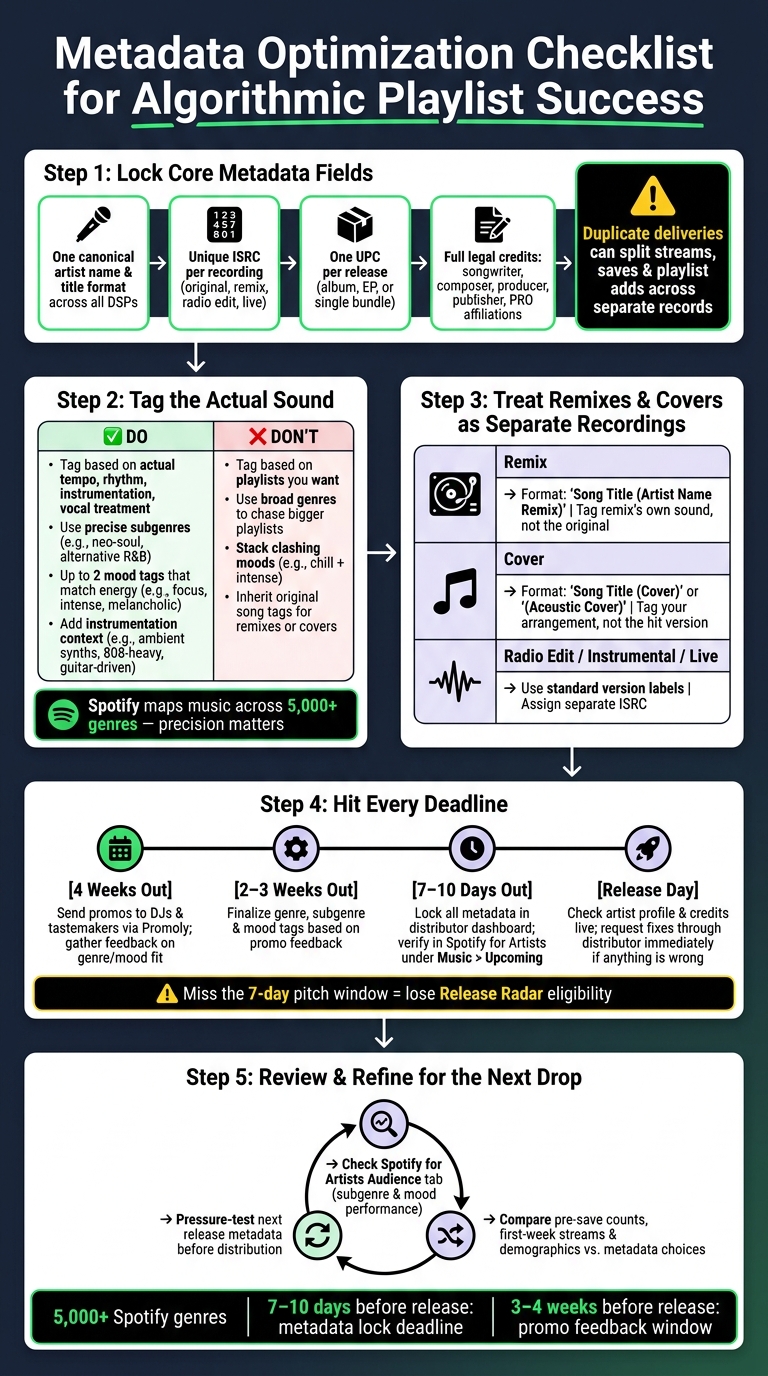
Metadata Optimization Checklist for Algorithmic Playlist Success
Get the Core Metadata Fields Right First
Before you get into genre or mood, nail the identity and delivery fields. These are the details that connect a release to the right artist profile and keep reporting tidy.
Once the track-level metadata is set, review the fields that control identity, delivery, and version matching.
Artist Names, Track Titles, and Version Formatting
Use one canonical spelling, capitalization, spacing, and punctuation across every release, distributor submission, and press asset. Even a small spelling shift can split catalog pages and scatter engagement.
Put each contributor in the right field:
- primary artist
- featured artist
- remixer
Don’t mash them into one name field or tuck them into the track title. Keep titles clean. Skip label names, promo language, and random ALL CAPS.
For each recording, use one standard version tag: Original, Remix, Radio Edit, Instrumental, or Live. Keep it simple and steady so platforms can match versions the right way.
Once naming is set, move to identifiers and credits.
ISRC, UPC, and Credit Data for Clean Delivery
Every distinct recording needs its own ISRC. That means the original, remix, radio edit, and live version each need separate codes. If you reuse an ISRC for different versions – or assign a new one just because you changed distributors – you can throw off platform reporting and create mismatched records.
The UPC works at the release level: one code per album, EP, or single bundle. It’s how the full release is recognized and linked across DSPs, physical distribution, and reporting systems. Track ISRCs and UPCs in one internal catalog, then send that same data to every partner.
Credit fields matter more than many teams think. Fill in songwriter, composer, producer, publisher, and label/imprint data with full legal names, percentage splits, and PRO affiliations. That’s not just about royalty admin. Complete credit data also helps entity matching across platforms.
Duplicate Releases and Linking Errors That Hurt Discovery
Even correct metadata can fall apart if the same recording gets delivered more than once.
Duplicates are one of the most damaging metadata issues, and they’re easy to miss. They usually show up when the same recording is delivered with different titles, artist spellings, or ISRCs.
Here’s where it gets rough: streams, saves, and playlist adds can end up split across separate records. Each copy then looks weaker than it is, which makes it less likely to hit the internal thresholds tied to playlists like Discover Weekly. And if listeners land on the wrong version and skip it, that only makes things worse. Skips are a negative behavioral signal.
The fix is simple in theory, even if it takes discipline in practice: standardize metadata and keep one canonical version per recording so engagement stays together.
With the core fields cleaned up, genre and mood tags can start pulling their weight.
sbb-itb-888513b
Use Genre, Mood, and Context Tags to Improve Recommendation Fit
Once identity fields are clean, genre and mood shape how platforms sort the track. They’re the last signals you can still control before release-day routing starts.
Choose Genre and Subgenre Based on the Recording, Not the Marketing Angle
A common mistake is tagging a song based on the playlists you want rather than the sound you actually made. That can backfire fast. Spotify recognizes more than 5,000 genres, so precise tags give recommendation systems a much better shot at placing tracks where they belong.
Start with the core sound of the recording: tempo, rhythm, instrumentation, and vocal treatment. If a neo-soul track gets tagged as broad R&B, it may land in bigger playlists where its slower, warmer feel doesn’t connect as well. Tag it more precisely as neo-soul or alternative R&B, and it’s more likely to sit next to songs with a similar groove and tone. Use secondary genres only when the crossover is real, like Latin pop + reggaeton.
One simple gut check helps here: search Spotify’s "The Sound of [Genre]" or "Introduction to [Genre]" playlists and see if your track matches that lane at a sonic level before you lock in the tags.
Add Mood, Instrumentation, Language, and Version Context
Genre sets the lane. Mood tells the platform when and why someone might play the track. That matters because many playlists are built around activities, energy, or feeling, not just style.
Pick up to two moods that match the track’s emotion and energy in a plain, honest way. A sparse piano piece works for focus or minimalist, which can help it fit study or concentration playlists. A high-BPM, bass-heavy song with aggressive vocals fits intense or dark, which lines up better with gym or gaming use cases. If you stack moods that clash, like chill and intense, the signal gets muddy and placement gets less accurate.
Instrumentation tags help fill in the picture. A track marked instrumental with details like ambient synths or lofi beats gives the system more context for focus and background listening environments. On the other hand, tags like guitar-driven or 808-heavy can place a song in the right sonic pocket.
Language and explicit flags matter a lot for U.S.-focused campaigns. A bilingual English/Spanish release that’s tagged the right way can compete in both English-language and Latin algorithmic lanes. Leave off the explicit flag, and you may lose playlist access altogether. If your distributor gives you cultural context fields, use them to note regional influences and help guide editors and algorithms toward the right discovery paths.
Handle Remixes, Covers, and Alternate Versions Without Confusing the System
Alternate versions need to be treated as separate metadata objects. That means their own genre and mood tags, plus version labels that describe the recording itself, not just the source song.
For remixes, use a steady title format like "Song Title (Artist Name Remix)" and list the original artist as the main artist, with the remixer in the right role field. Then tag the remix based on its sound. If an indie pop original gets turned into melodic techno, the remix should carry electronic subgenre tags and moods like energetic or dark. It should not inherit the pop tags from the original.
For covers, keep the original song name in the title and add a clear label such as "(Cover)" or "(Acoustic Cover)" where platform rules allow. Tag the arrangement you recorded, not the hit version people already know. A stripped-down piano cover may fit indie folk and melancholic, not the pop tags tied to the original release. Clear labeling helps keep that version lined up with the right playlists.
After release, compare your tag choices against performance data, then use what you learn to tighten future submissions.
Connect Metadata Optimization to Your Release Workflow and Promotion
Check Metadata in Your Distributor Workflow and Spotify for Artists
Once the core fields are set, timing becomes the next big thing. Lock your metadata 7–10 days before a Friday release so Spotify has time to ingest it and show it in Spotify for Artists under Music > Upcoming.
That timing matters more than it may seem. A clean delivery gives Spotify time to index the track before Release Radar and other algorithmic surfaces start judging it. If you miss the 7-day pitch window, you can lose Release Radar eligibility and blunt those early engagement signals.
In your distributor dashboard, double-check the fields that carry the most weight:
- artist name spelling
- track title and version tags
- ISRC and UPC codes
- genre and subgenre
- language
- explicit flag
Then use the Spotify for Artists pitch form to confirm genre, mood, instrumentation, and audience context. A simple two-person sign-off helps here: one person enters the metadata, and another reviews it. On release day, check the artist profile and credits, and if anything looks off, request fixes through your distributor right away.
Use Promotion Data to Refine Future Genre and Mood Choices
Once your metadata is live, promo feedback can tell you if those tags line up with how listeners describe the track in practice.
Promoly can help with that workflow. Send promos 3–4 weeks before release so you can gather feedback from DJs and tastemakers before the Spotify pitch is finalized. If the responses line up, use them to tighten your genre, subgenre, and mood tags.
Smartlinks and pre-saves also help keep key details lined up across promo assets and streaming links, including titles, artist names, release dates, UPCs, ISRCs, and Spotify URIs. After release, compare pre-save counts, first-week streams, and Spotify for Artists demographics to see whether your metadata choices matched listener behavior.
Then use those results to pressure-test the next release before it goes out for distribution.
Metadata Quality Control Checklist and Key Takeaways
Pre-Release Metadata Checklist for U.S.-Focused Campaigns
After your workflow pass, use this checklist to catch issues that can stop indexing or pitching before Spotify picks up the release for Discover Weekly, Release Radar, and Radio. Think of it as your last check before delivery. Run it 3–4 weeks before release, then do one more pitch review at least 7 days out.
| Field | What to Verify |
|---|---|
| Artist Name | Spelling matches exactly across all DSPs and promo assets |
| Track Title & Version | Correct title and version label across all platforms |
| ISRC / UPC | Unique codes assigned; consistent across distributor and DSPs |
| Genre / Subgenre | Reflects the actual recording, not just the marketing angle |
| Mood & Instrumentation | Accurate descriptors entered in the pitch form |
| Explicit Flag | Accurately marked to avoid being filtered from clean playlists |
| Credits | All legal credits complete: featured artists, songwriters, producers, and engineers |
| Release Date | Confirmed and consistent across DSPs, smartlinks, and press materials |
The explicit flag is one of those small details that can cause a big headache. If it’s set the wrong way, the track can miss clean playlist placement.
Key Takeaways for Improving Algorithmic Playlist Visibility
Once the release is live, check performance data to see whether your metadata lined up with how listeners actually responded. That post-release read gives you a better sense of what to adjust next time.
A few things carry the most weight:
- Accurate identifiers help avoid split counts and indexing errors.
- Precise genre and mood tags help place the track into the right queues.
- On-time delivery gives Spotify enough room for ingestion and pitching.
After release, use the Audience tab in Spotify for Artists to tighten up subgenre and mood choices for the next release. That loop matters: check metadata before release, study audience behavior after release, then fine-tune the next submission.
FAQs
How do metadata mistakes split streams?
Metadata mistakes can split your streams when artist details don’t match from one platform to the next. A small change, like spelling the artist name a bit differently, can cause a big mess. The same goes for switching distributors for a re-release and not keeping the same ISRC. That can lead to duplicate profiles or broken-up records.
When that happens, platforms may not combine your total play counts. And that can weaken your performance data while also hurting algorithm-driven recommendations. The fix is pretty simple: keep your metadata identical and accurate across every distribution point so your streaming history stays in one place.
When should I lock metadata before release?
Lock and double-check your metadata before you send files to your distributor. Once a release is live, fixing mistakes can be hard – or not possible at all.
Check every detail: track titles, artist names, genre tags, and ISRC codes. They should be final and error-free. A good rule of thumb is to wrap this up 3 to 4 weeks before your release date, so platforms have time to process everything and editors have time to review it.
Should remixes and covers use new metadata?
Yes. Remixes and covers need accurate, version-specific metadata so the right people get credit and listeners can find the track.
Make sure the track title, artist names, and featured credits match the new version and stay in line with the rest of your catalog. Metadata also helps platforms and recommendation systems sort your music. If something is off, it can hurt playlist visibility. And once a release is live, fixing those details can be hard – or not possible at all.