How we rebuilt the promo email DJs receive, in eight review rounds
The email a DJ opens when a label sends a promo now leads with the artwork and sets its message at a standard reading width. Here's every decision, and the standard behind it.
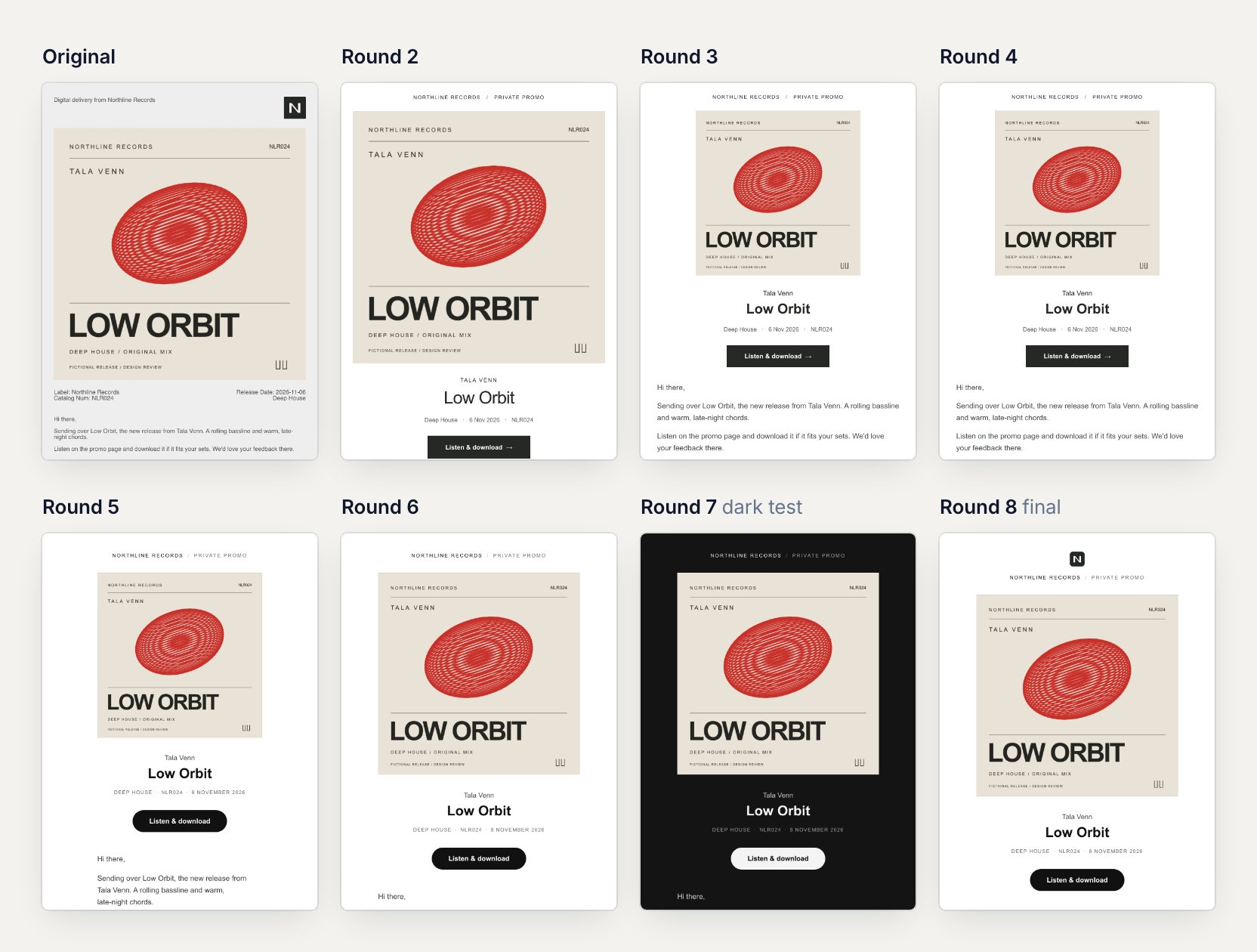
A promo email has one job: get a DJ from the inbox to the music.
Ours did that job inside a grey frame that read like a form. Release details sat in label-and-value pairs ("Catalog Num: NLR024"), and the message ran about 90 characters a line in 13px type with no extra space between lines. The button came last, small and orange.
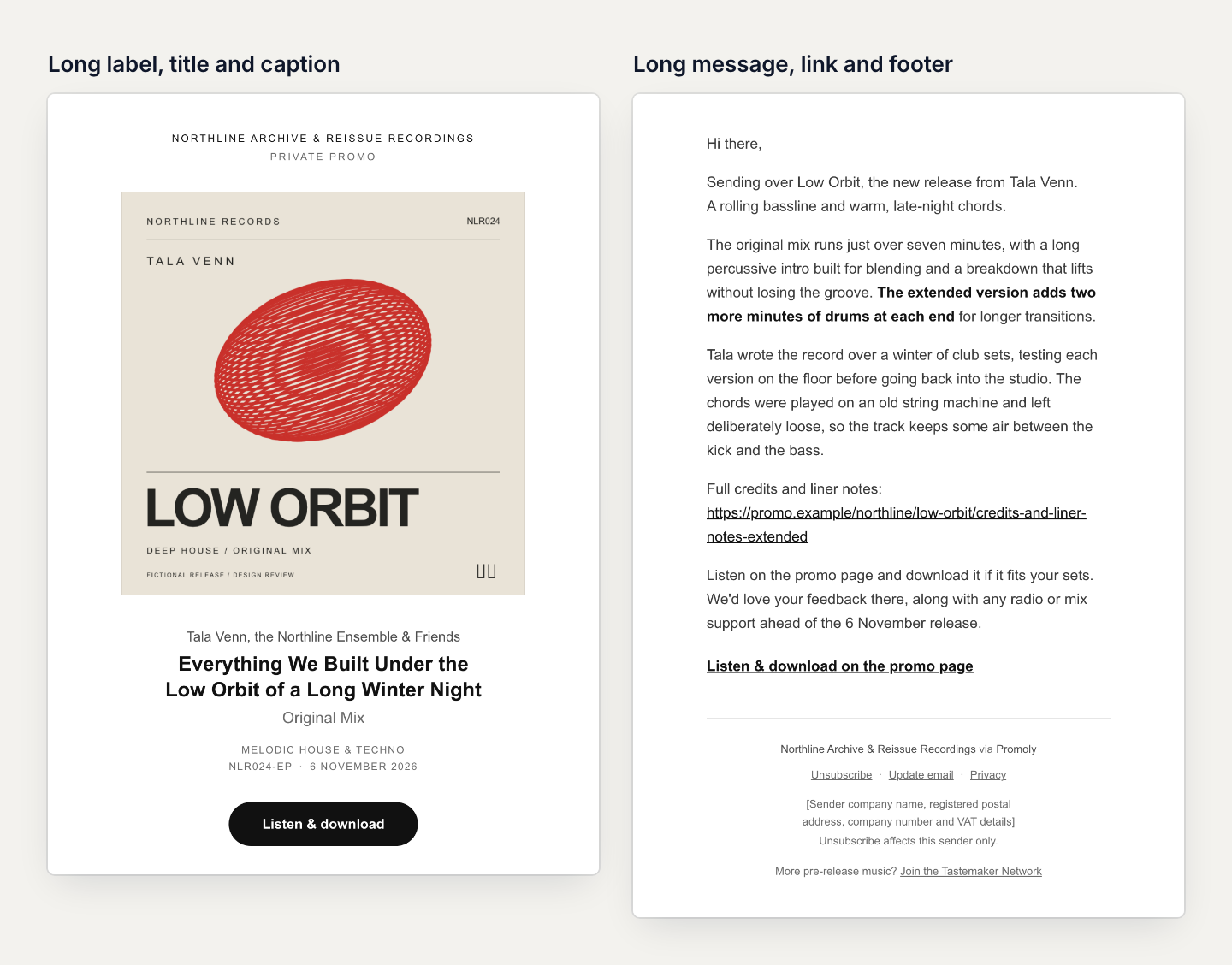
The redesign is white and built on one column. The cover sits on its own row, uncropped. Under it, a short title block names the artist, the release, the genre, the catalogue number and the date. A charcoal "Listen & download" button comes before the message, and the message is set at a standard reading width. The footer covers what the old 43-word legal paragraph did, plus a privacy link and the sender's postal address, in a few short lines.
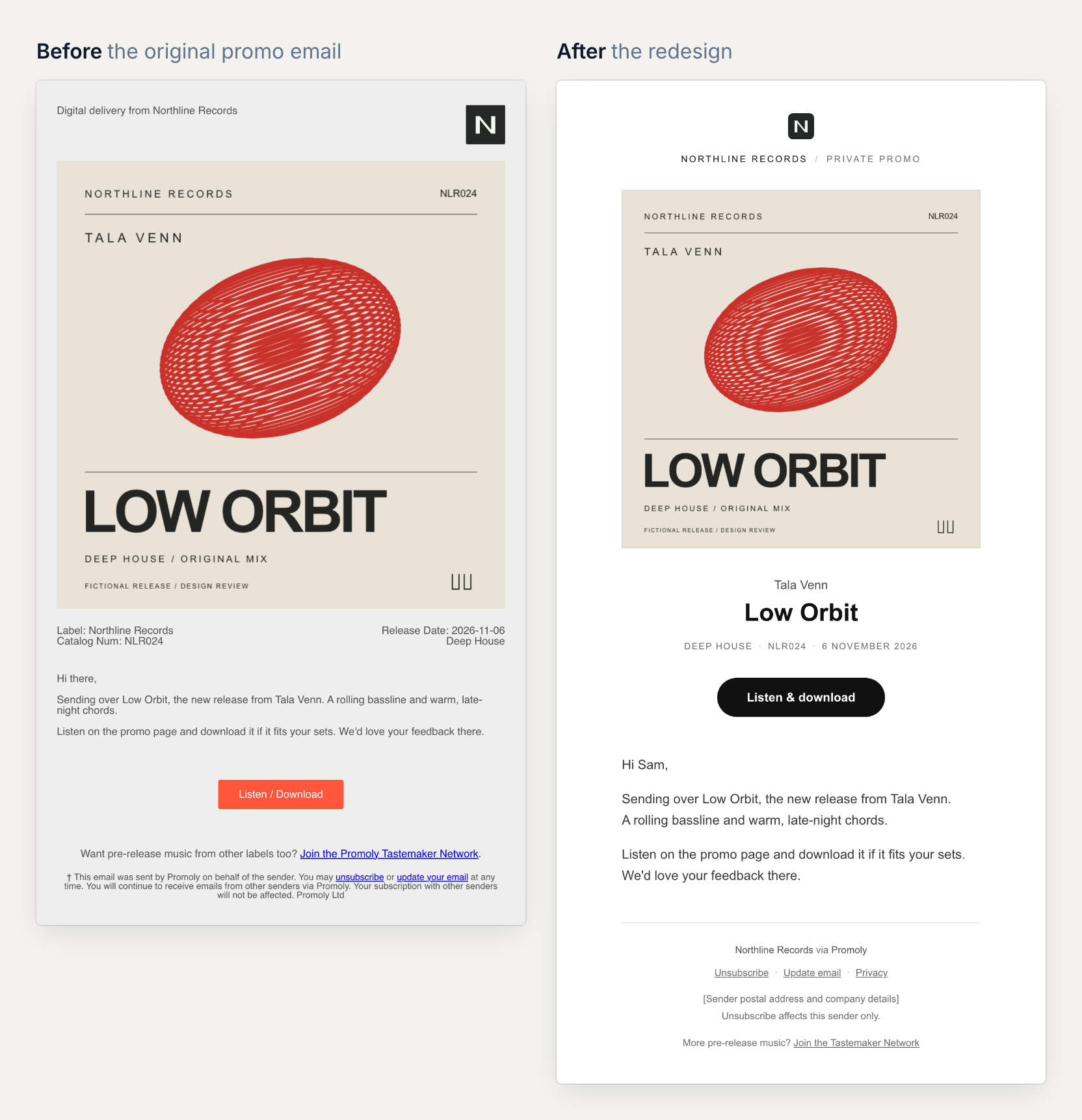
We got there over eight review rounds in October 2026. Below are the decisions in the order a reader meets them, each with the standard behind it, and then how the review worked. The release in every image was invented for the review, and so were the test covers. Any resemblance to a real artist or label is coincidental, and no customer data appears anywhere.
Every promo campaign sent through Promoly uses the new design from 28 October 2026. Pre-save and link campaigns, and Promoly's other emails, keep their current look for now. We haven't measured how it performs yet, so this post makes no performance claims.
The button over the artwork had to earn its place
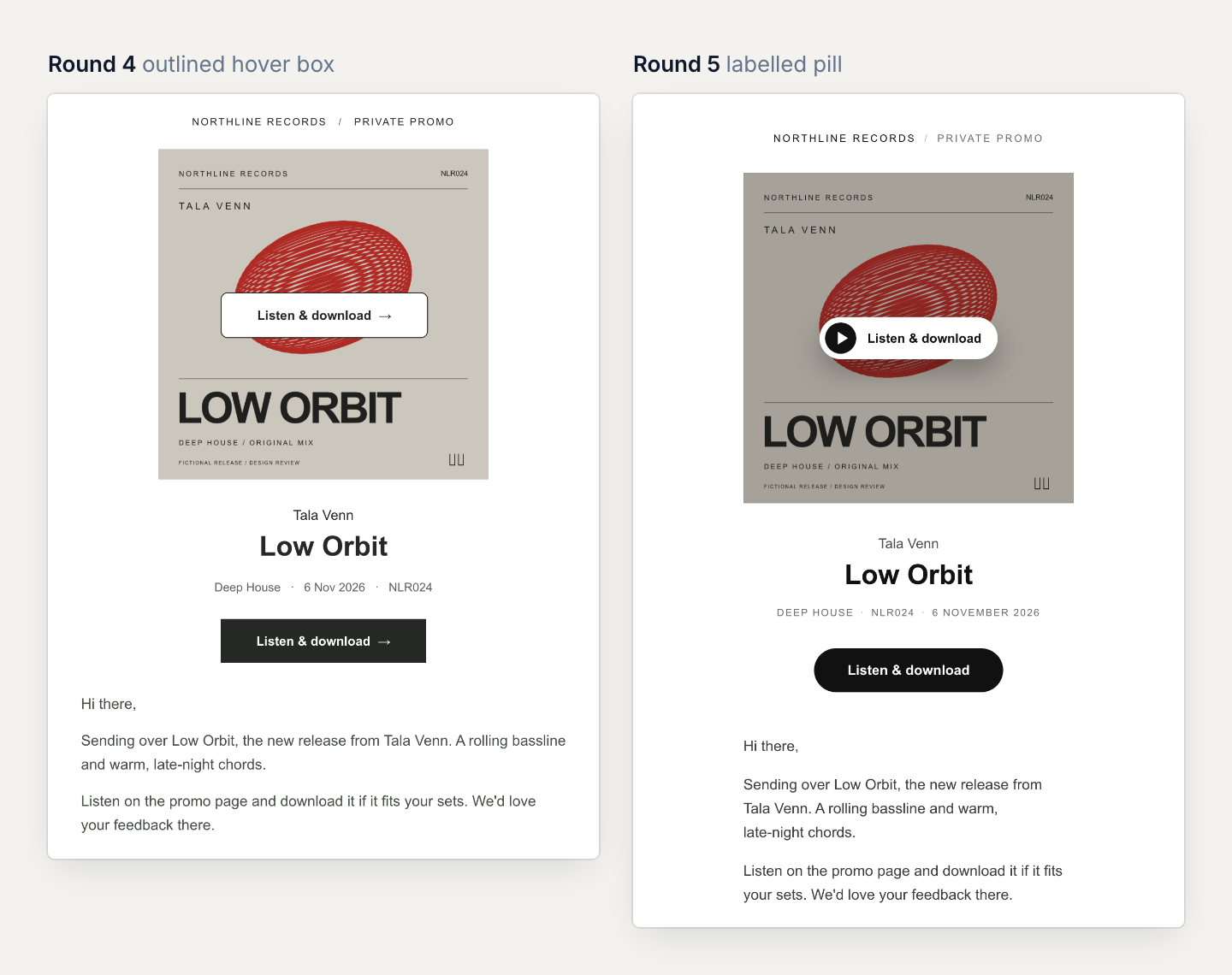
In round 3 we tried an optional extra: hover over the cover on a desktop and a "Listen & download" button appears on it. Round 4 rounded its corners. The note that came back on round 4 was blunt: "rounded corners look fine but it still looks unprofessional. This needs to be substantially improved."
Taking it apart showed why. The control was a 224 × 48px white box with a hard 1px outline, parked on the red shape at the centre of the cover. It repeated the button below it word for word, down to a typed arrow, and its rounded corners clashed with the square button underneath. The message ran 528px wide under a 360px cover, so nothing in the email shared an edge.
Round 5 started over with two candidates: a 68px play mark on a soft vignette, and a labelled pill. A third idea, a control docked in the corner, was dropped because it collided with type printed on the sleeve. The pill went forward: borderless, 194 × 46px, with a charcoal play disc and the words "Listen & download" over a 30% scrim.
Hover needs a mouse or trackpad, and plenty of mail apps ignore it anyway. In Can I email's tests (last run in 2019), Apple Mail supports hover effects, while the Gmail and Outlook apps on iOS and classic Outlook for Windows don't. So the pill only appears in desktop apps that report both hover and a fine pointer, and its 0.2-second fade switches off for readers who've asked their system to reduce motion. Everywhere else the cover is a plain link and the button below does the work.
The button keeps your settings. If you've written your own button text in the campaign editor, the email uses it. Otherwise it reads "Listen & download", or "Listen now" when Enable Downloads is off. If you changed the button colour from the old default orange, the email keeps your colour as long as it reaches 3:1 contrast against the page, the WCAG minimum for interface components, and its text reaches 4.5:1. If it doesn't, the email uses charcoal.
One column, set to 50 to 75 characters a line
Round 5 also rebuilt the email as one column. The cover, the release caption, the button, the message and the footer rule now share one width, so the email reads as one composed block. That fixed the alignment and created a new problem, which the round 5 notes named: "The number of words per row in the body text needs work. It needs to follow standards for scannable lines-text in an email body."
The sources broadly agree. Baymard Institute puts the best line length for body text at 50 to 75 characters. Butterick's Practical Typography allows an average of 45 to 90. WCAG's AAA guidance on visual presentation suggests lines of no more than 80 characters and line spacing of at least 1.5 within paragraphs. Email has its own data point: when Anna Yeaman measured 50 emails she picked for their typography, for Smashing Magazine in 2015, lines averaged 78.5 characters on desktop and 39 at 320px wide.
Line length matters more because people scan. In a 1997 Nielsen Norman Group study, 79 percent of test users always scanned any new page they came across, and only 16 percent read word by word. The same article notes a later finding that people read email newsletters even more abruptly.
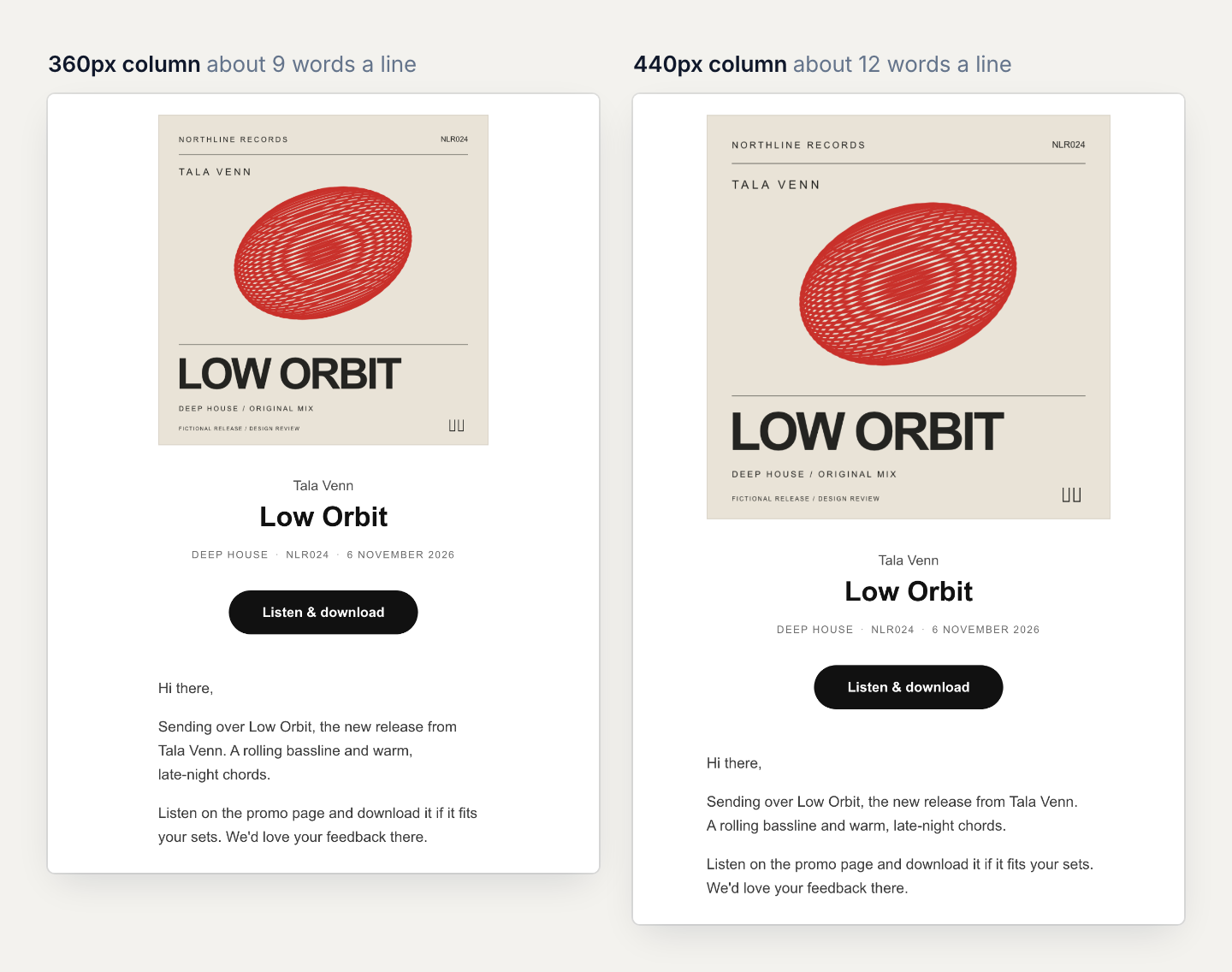
So we measured our own copy in 16px Arial. A 360px column set 45 to 49 characters a line, about nine words, just under the range. At 440px it set about 60, around twelve words, and 480px set 65 to 66. Keeping one shared column at a standard measure meant growing the cover to 440px, the size round 3 had already picked as the best overall. Lines sit 26px apart on 16px type, a little more than the 1.5 spacing WCAG suggests, and on a 375px phone the column narrows with the screen to about 44 characters.
Long titles and long messages follow rules
Demo copy is always short. Real releases aren't, so round 6 stress-tested titles and messages at their worst.
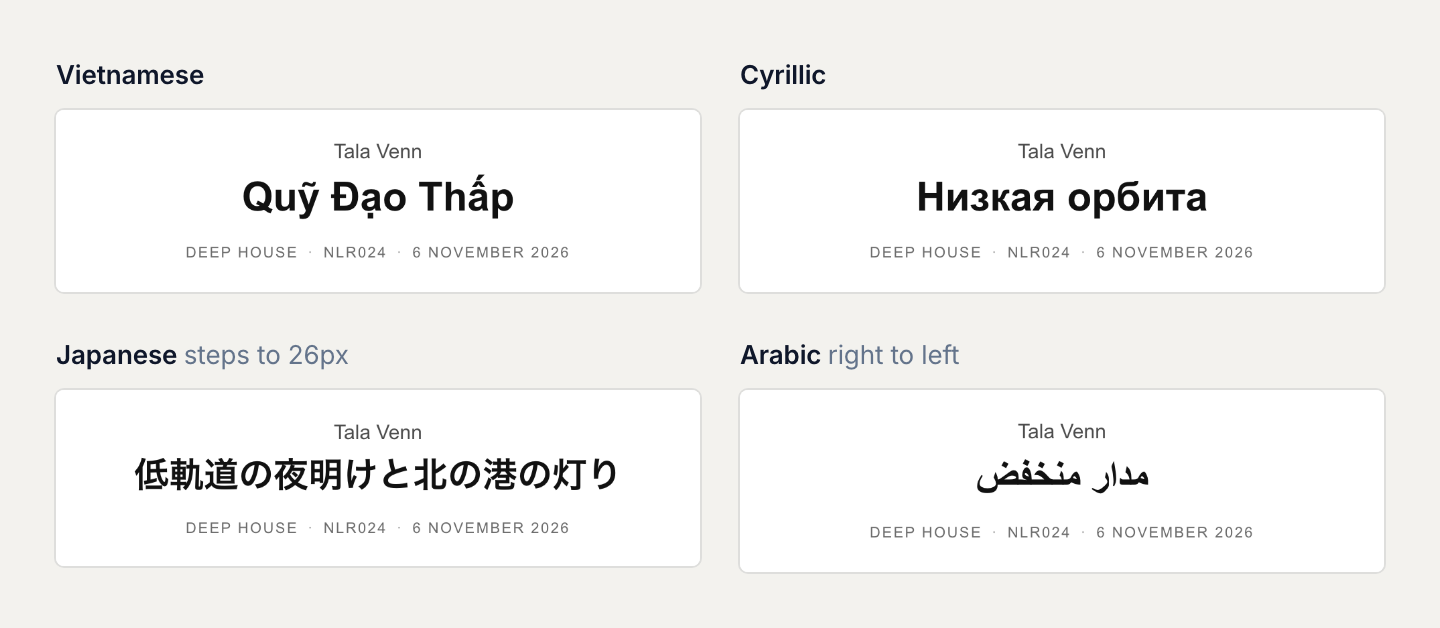
Titles size themselves by length. Up to 26 width units, a title sets at 30px. From 27 to 44 units it steps to 26px, and anything longer drops to 22px (28, 24 and 21px on phones). Lines are balanced so a title never leaves one word alone on its last line. A version name such as "Extended Club Mix" moves to its own lighter line instead of crowding the title, and long label names and captions stack onto two lines rather than breaking mid-phrase.
Long messages get the same care. Links wrap inside the column. Names, dates and one-letter words stay with their neighbours, and after about 110 words a closing link repeats the destination so nobody has to scroll back up to the button.
Width units matter most for titles outside the Latin alphabet. Unicode classes characters such as Chinese and Japanese ideographs as East Asian Wide, and in fixed-width fonts they take twice the space of a Latin letter. Our sizing rule counts each one as two units, so a 14-character Japanese title steps down to 26px. Titles, artist names and track titles also detect their own text direction, so an Arabic title sets right to left.
Dark mode works three different ways
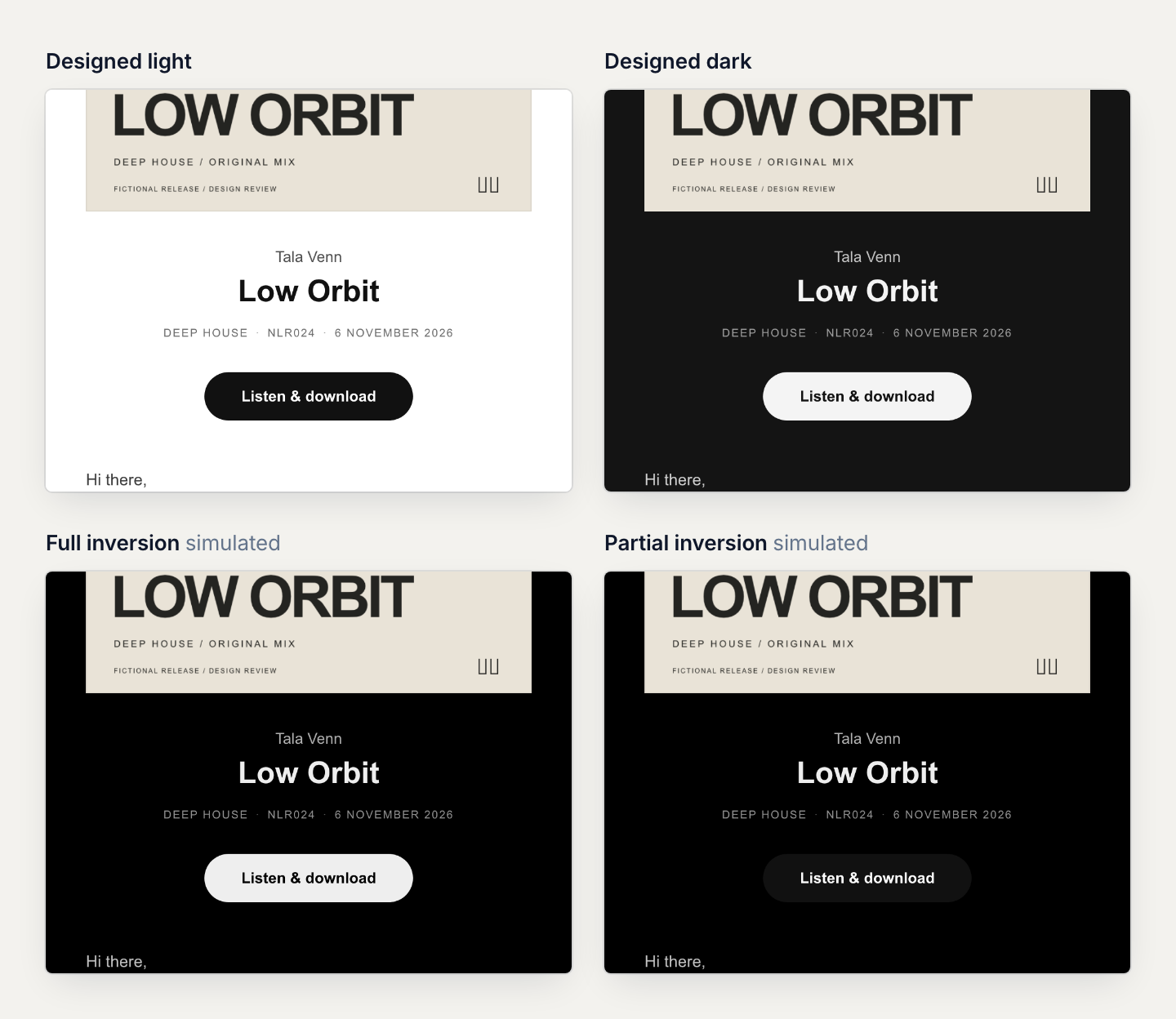
Litmus sorts mail apps into three groups. Some leave an email's colours alone, some invert only the light backgrounds, and some invert everything. A design has to hold up in all three.
The new email brings its own dark palette for apps that let it choose: a #141414 page with a light button. Every line of text keeps at least 7.0:1 contrast, the WCAG AAA level. In light mode the lowest text contrast is 5.3:1, above the 4.5:1 AA minimum.
Simulating the other two modes turned up a problem the design can't fully solve on its own. Under partial inversion the page turns dark but the charcoal button stays charcoal, so it meets the page at 1.1:1 and loses its shape. Real inbox tests found the same thing in Gmail on Android in dark mode: the button's edge disappears into the page, while its words stay readable. Outlook.com's dark mode, like Apple Mail's, used the designed palette. Gmail's iOS app, which inverts everything, couldn't be tested in dark mode, because the testing service no longer offers it.
Artwork we don't control
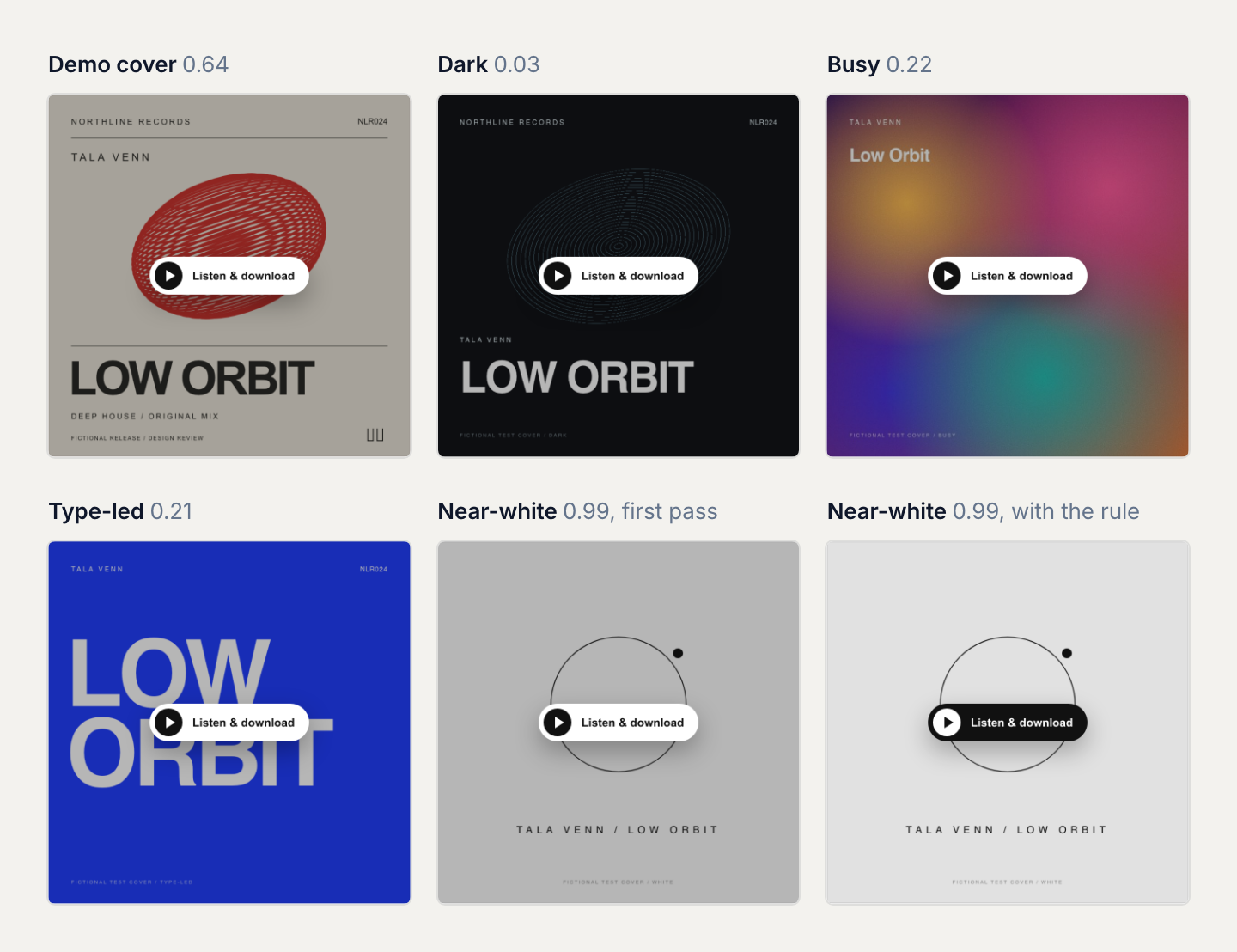
Labels upload whatever the release looks like, so round 7 tried the hover pill on four test covers made for the review: a dark sleeve, a busy gradient, a type-led design and a near-white one. The pill held up on the first three. On the near-white cover, a white pill on a pale scrim looked weak.
The fix is a rule, worked out once for each cover the first time it's sent. The cover is measured for average brightness on the relative luminance scale WCAG uses for contrast, where 0 is black and 1 is white. At 0.85 or more, the pill turns charcoal on a lighter 12% scrim. If the cover's edges reach 0.9, it also gets a stronger hairline so the artwork doesn't melt into a white page. Our demo cover measures 0.64 and keeps the standard pill.
With images off, the email still says what it is
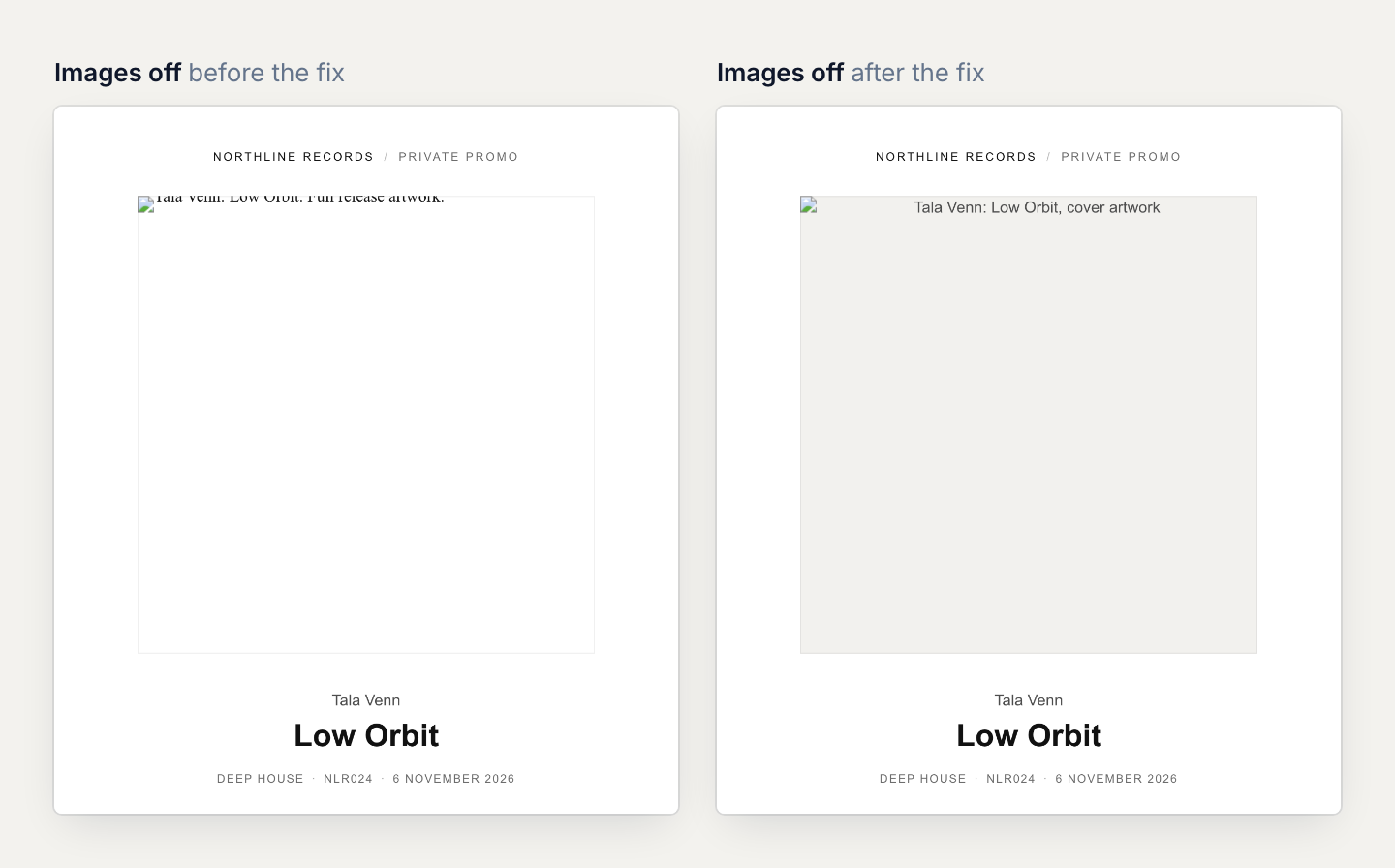
Some mail apps don't load images until the reader allows them. Classic Outlook, for one, blocks automatic picture downloads by default. In that state an email has to stand on its alt text and its layout.
Testing the approved design with images blocked found a real defect. The cover's alt text inherited a line height of zero and was clipped, so the email showed what looked like an empty 440px box. The fix gives the alt text its own styling, shortens it to the artist, title and "cover artwork", and sets it on a neutral #f2f1ee cell so the space reads as a cover that hasn't loaded yet.
Long track lists show four tracks, then a link
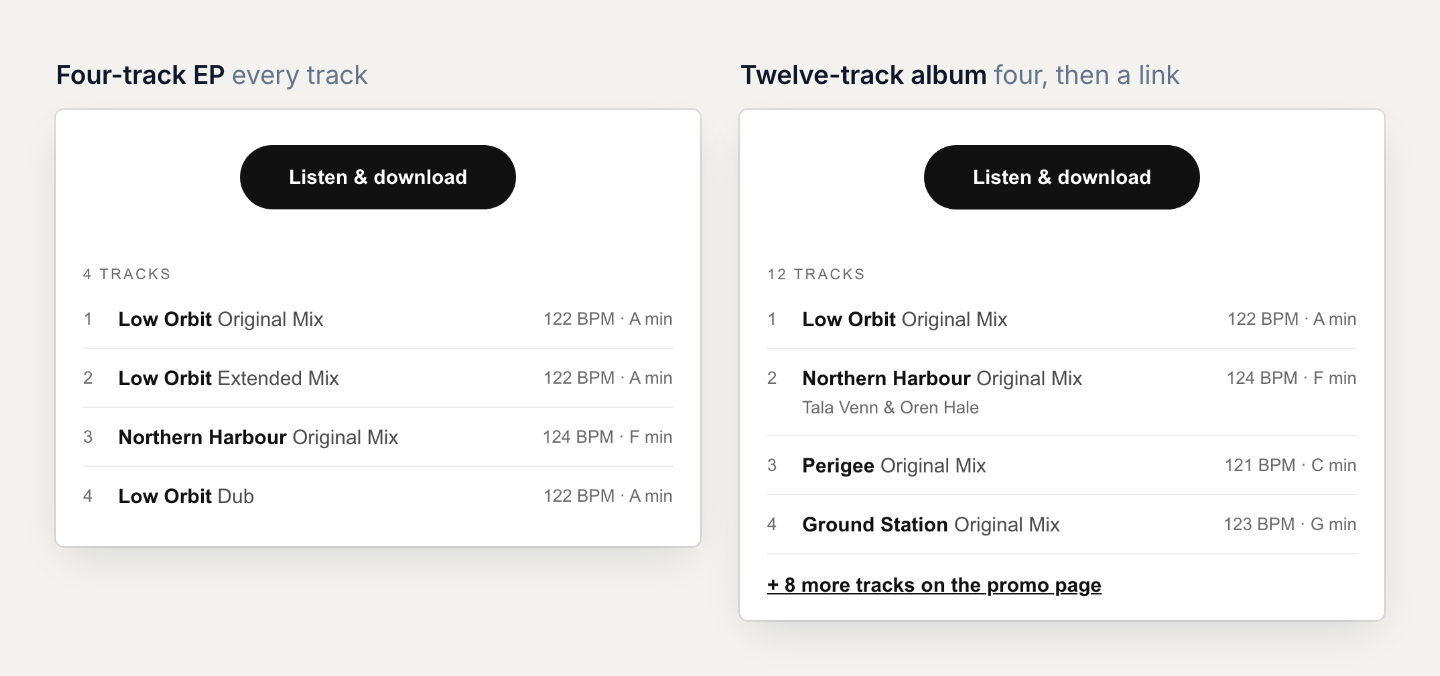
EPs and albums raised a fair question in round 7: "What if there are lots of tracks? we need to avoid really long body."
The obvious worry was size. Gmail clips any message over 102KB of HTML and hides the rest behind a "View entire message" link (Litmus, Mailchimp). This template weighs about 12KB plus 0.7KB per listed track, though, so even 60 tracks would come to about 55KB. Size wasn't the limit. Length was. Constant Contact found that about 20 lines of text, roughly 200 words, gets the highest click-through rate for most industries.
So round 8 set a cap. A release with up to five tracks lists them all. From six tracks, the email shows the first four and a "+ N more tracks on the promo page" link. Each row carries what DJs scan for: the title, the version, any featured artist, and the BPM and key. A capped twelve-track album comes to about 16KB.
Your subject line stays yours. The preview text is new
Round 7 also asked whether the template should write subject lines. The answer came back in one line: "the campaign editor allows users to set their own subject". So the template never rewrites a subject. When the subject field is empty, the editor suggests "Artist: Title" as a starting point.
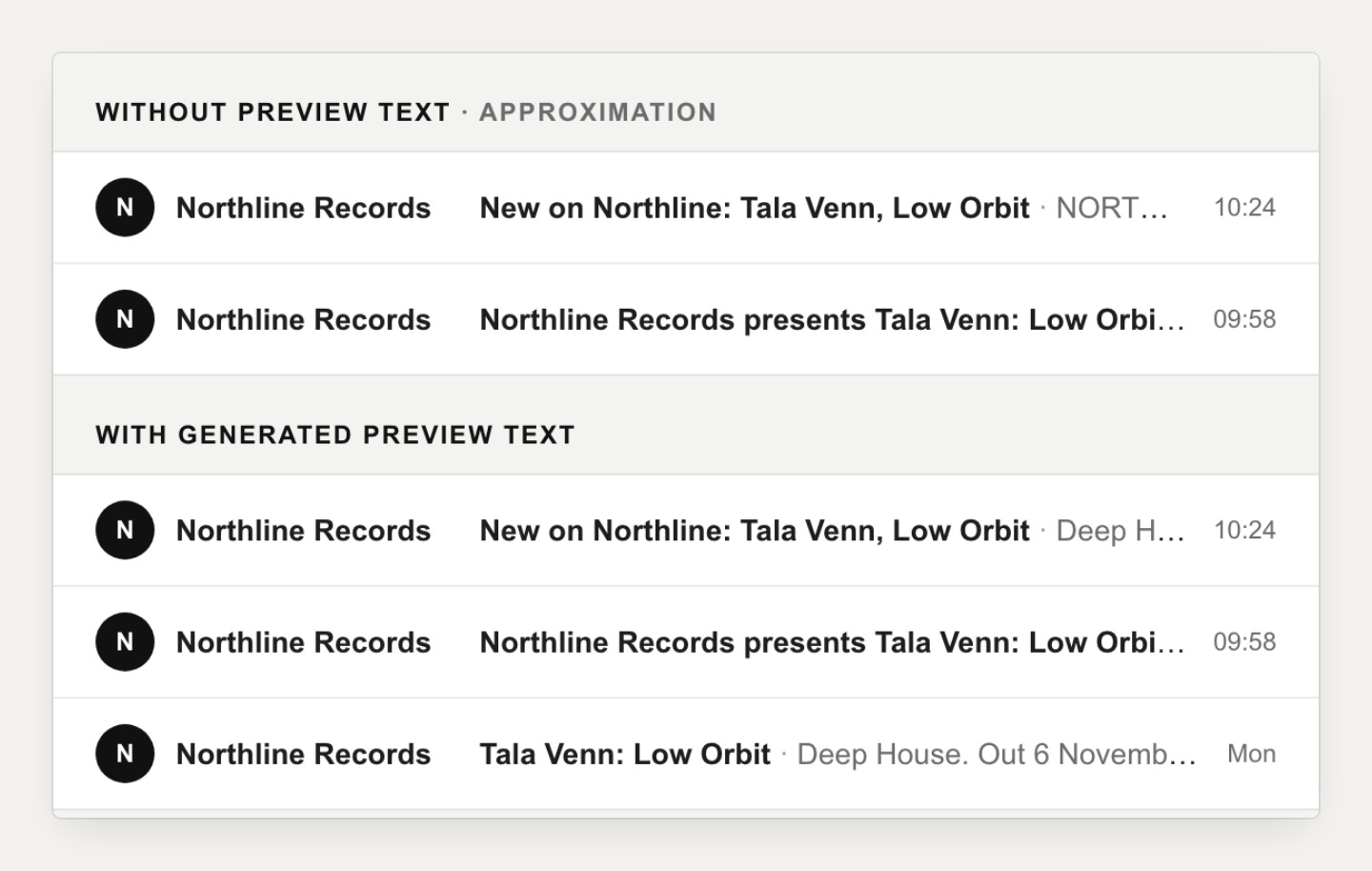
Preview text is the grey line most inboxes show after the subject. The old template didn't set any. Without it, inboxes usually pull the first lines of copy instead, and a few read an image's alt text. For our old email, that meant whatever text happened to come first.
The new email writes its own from the release details: "Deep House. Out 6 November. Listen to Low Orbit on your private promo page." It stays under 90 characters, the length Litmus recommends, by dropping the title when it would run long. Invisible padding follows it, so the inbox doesn't pull body text in after it.
Details for screen readers, Outlook and the rest
Most of this work is invisible until it's missing.
- The email sits inside the accessible wrapper Good Email Code recommends, so a screen reader announces it as an email, named by its subject, in the right language.
- Classic Outlook for Windows renders email with a Word-based engine and ignores rounded corners, so the button there is a plain square instead of a pill. Every other app gets the standard button.
- A plain-text version carries the same content in the same order, with real links and the same track cap.
- The cover is requested at 880px, twice its display size, so it stays sharp on high-density screens.
- If your profile has a logo, it sits above the header as a 32px mark.
- Every link is at least 24 × 24px, the WCAG 2.2 minimum target size.
- New campaigns open the message with a greeting that uses the DJ's first name when it's usable ("Hi Sam,") and falls back to "Hi there," when the stored name is empty, is an email address or runs over 30 characters.
axe-core, Deque's open-source accessibility engine, found no WCAG A or AA violations in the round 7 build. Automated checks only catch part of the picture (Deque puts it at about 57 percent of WCAG issues on average), and we haven't yet checked the email by hand with a screen reader.
Eight rounds, each built from the last round's notes
Each round was a self-contained review page. It put the candidate designs side by side with the previous round, with switches for a 600px desktop or 375px phone width, for the hover control (on hover, pinned on, or the fallback), and for images on or off. Design notes stayed hidden until asked for. A feedback form saved in the browser and copied out as plain text.
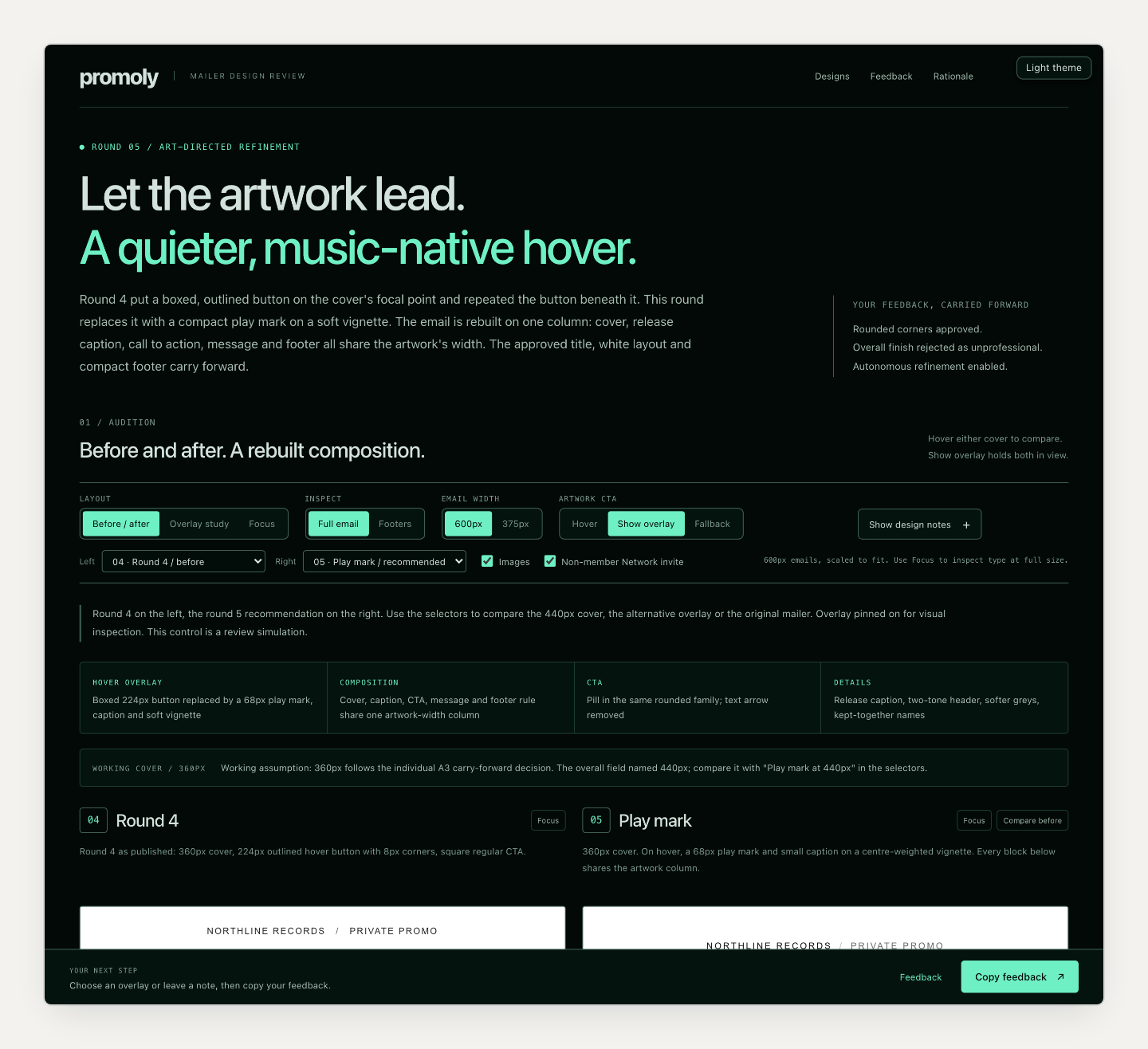
The notes from each page became the brief for the next round, and nothing was dropped between rounds. Round 2 tested three directions, and the white one went forward with a modest verdict: it "looked close to the original but slightly better." Round 4's note sent the hover control back for a rethink rather than a tweak. Round 6 was approved as the base design. Round 7 explored nine cases around it and adopted seven, and the other two, long track lists and subject lines, came back as the questions round 8 answered. The build spec was approved on 28 October 2026.
The image at the top of this post shows the email at the end of each round. Round 1 was a critique of the original, so the strip starts there. Round 7's panel shows one of its nine explorations, the designed dark palette, and round 8 is the approved build spec.
The design rounds were produced by Claude Opus 5.5, an AI model made by Anthropic, working in agent sessions from those written notes. Claude drafted each round's designs and review page. A person on our team reviewed every page and made every decision, including which direction to keep and when a rule was good enough.
Each page was also checked in a real browser with Playwright before it reached review. The checks covered hover, keyboard focus, touch and fallback behaviour, the cover's aspect ratio, sideways scrolling at 375px, where every link pointed, and whether feedback saved, restored, copied and downloaded correctly. Round 7 added the axe-core pass and a pixel-by-pixel comparison against the approved design. Round 8 measured the HTML size.
Browser checks aren't inbox tests. Mail apps rewrite HTML in their own ways, so on 28 October 2026 we ran the build through Mailgun Inspect, a service that captures an email as real mail apps display it. The tests covered Apple Mail on macOS and iOS, Gmail on the web, Android and iOS, Outlook.com, Outlook for iOS, the new and classic Outlook for Windows, Yahoo and AOL.
The first run found two problems in classic Outlook, and both were fixed before release. The hover label, which should stay hidden there, showed as a grey strip under the cover, and in dark mode the button's label turned dark on its dark fill. A second run on the released email passed in classic Outlook 2016, 2024 and Microsoft 365, including dark mode. Every other app passed in light mode. In dark mode all of them passed except Gmail on Android, which lost the button's edge, and Gmail's iOS app, which we couldn't test. With the images failing to load, a grey cell held the cover's place in all seven apps we tried, and the button and text stayed readable.
Real inbox numbers come next
We can't tell you yet whether the new design gets more DJs to the music. It reached every promo at once on 28 October 2026, with no gradual rollout. We'll share what changed in opens, plays and downloads once enough campaigns have gone out to compare fairly.
Your next promo goes out in the new design. Start a campaign from your dashboard.