Music Promotion Checklist: 15 Tasks Before Launch Day

Releasing music without a plan is a common mistake that can hinder success. To make your launch impactful, preparation is key. This checklist covers everything you need to do 6–8 weeks before release day to ensure your music gets the attention it deserves.
Key Takeaways:
- Mastered Audio: Upload uncompressed WAV files (16-bit/24-bit, 44.1kHz+) and finalize metadata like ISRC codes and ownership splits.
- Cover Art & Visuals: Ensure artwork is 3,000×3,000 pixels in JPEG/PNG format. Add press photos, Spotify Canvas (3–8 sec videos), and teaser clips.
- Pre-Save Campaigns: Launch 3–6 weeks ahead using platforms like Promoly to boost early streams and algorithmic placement.
- Playlist Outreach: Submit pitches to Spotify and Apple Music 2–4 weeks in advance. Contact independent curators for wider exposure.
- Press & Profiles: Update artist profiles, write a press kit, and reach out to media outlets 6–8 weeks before release.
Quick Tips:
- Submit to Spotify editorial playlists at least 7 days before release.
- Use Promoly smartlinks for pre-save and streaming platforms.
- Test all links, metadata, and visuals 3 days before launch.
With 120,000 songs uploaded daily to Spotify, standing out requires a well-organized campaign. This checklist ensures nothing critical is missed, setting your release up for success.
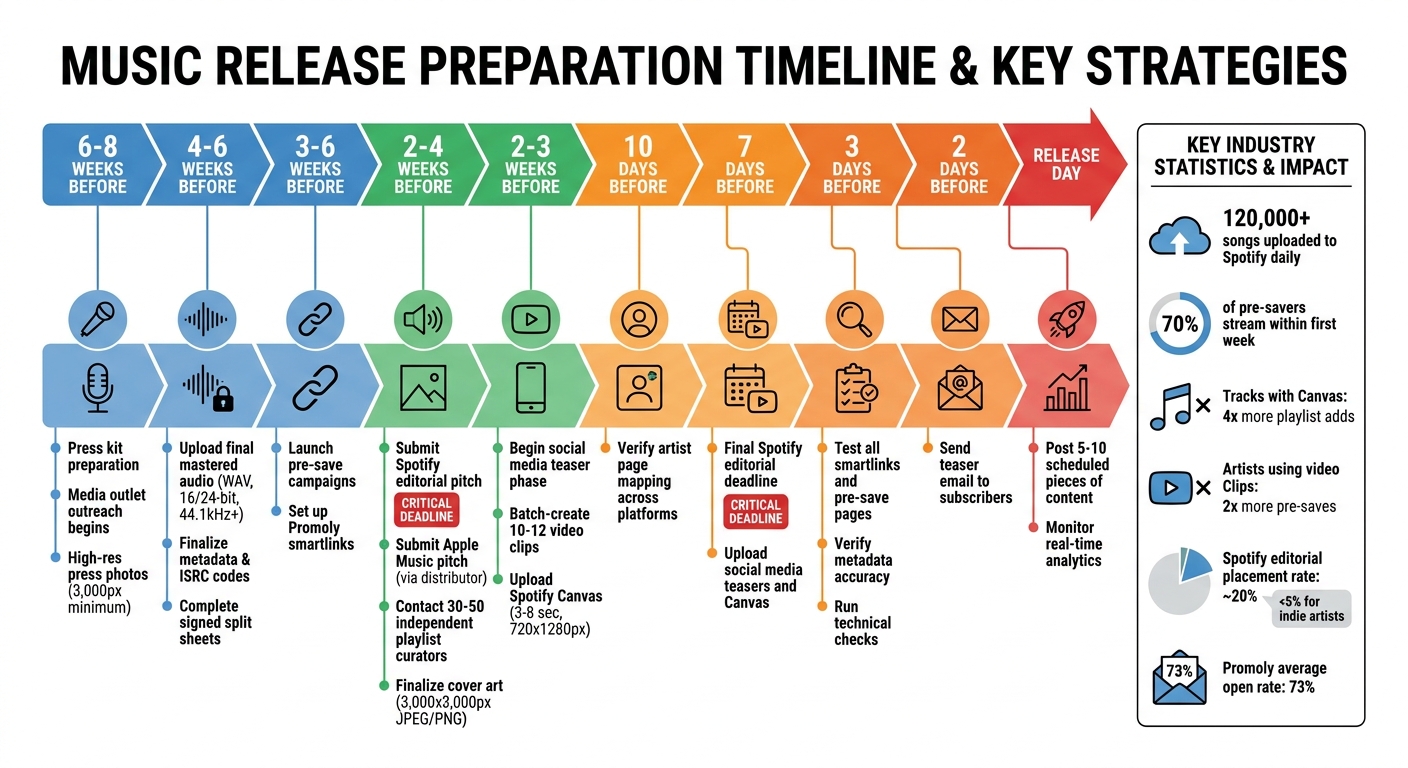
Music Release Timeline: 6-8 Week Pre-Launch Checklist
The Ultimate Step-by-Step Guide to Promoting Your Music Release | Music Biz 101
sbb-itb-888513b
Section 1: Core Promotional Materials
Your audio files, visuals, and teaser content are the backbone of your promotional efforts. Without these ready to go early on, you’ll hit roadblocks in distribution, pitching, and social media campaigns.
Complete Final Mastered Audio Files
Start by uploading your finalized, uncompressed WAV files (16-bit or 24-bit, 44.1kHz or higher). This ensures you avoid quality loss when platforms compress your audio. Submit these files 4–6 weeks before release to allow platforms enough time for processing and editorial pitching. Additionally, prepare instrumental, clean (radio edit), and stem versions. These open up opportunities for sync licensing and remixes. Don’t forget to label tracks as "explicit" if they contain profanity – this helps avoid playlist removal or age restrictions.
Metadata is just as critical as the audio itself. Apple Music for Artists emphasizes that accurate metadata is "essential to building and growing an audience", and errors can disrupt your release schedule or promotional efforts. Assign each track an ISRC code to track streams and royalties. If you’re switching distributors for a re-release, keep the same ISRC to avoid splitting your streaming data. Also, finalize a signed split sheet before uploading to confirm ownership percentages and prevent future royalty disputes.
Once your audio and metadata are in order, it’s time to focus on creating compelling visuals.
Finalize Cover Art and Photos
With your audio ready, turn your attention to visuals that will make your release stand out. Your cover art should meet industry guidelines: a minimum resolution of 3,000 x 3,000 pixels, saved as a JPEG or PNG in RGB color mode. Avoid including URLs, social media handles, pricing, or misleading text. Test the design at thumbnail size to ensure any text remains readable.
"Poor artwork signals amateur status to playlist editors, press, and listeners." – Orphiq
In addition to your cover art, prepare 2–3 high-resolution press photos. These should be in portrait, landscape, and close-up formats with at least 3,000 pixels on the longest edge. Adapt these images for various platforms: square crops for Spotify, vertical formats for Instagram Stories and TikTok, and landscape versions for YouTube or Twitter headers. If you’re releasing singles ahead of a larger project, ensure each piece of artwork ties into the overall design theme.
Another visual tool to consider is a Spotify Canvas – a short 3–8 second looping vertical video (720 x 1280 pixels, 9:16 ratio). Tracks with a Canvas are saved or added to playlists over 4x more often than those without one. Plus, when listeners share tracks with a Canvas to Instagram or Facebook Stories, the visual is included in the post, boosting exposure.
Once your visuals are polished, move on to creating teaser videos to build anticipation.
Create Short Teaser Videos
Pair your finalized audio and visuals with short, engaging video teasers to drive social media buzz and pre-saves. Create 3–5 vertical teaser clips (10–30 seconds each) designed for TikTok, Instagram Reels, and YouTube Shorts. Artists who use video Clips on their Spotify Countdown Pages report an average of 2x more pre-saves compared to those who don’t. To save time, batch-produce 10–12 clips in one session, using different outfits and backgrounds to keep your content fresh.
Experiment with a mix of performance footage, lip-syncs in interesting locations (outdoor settings often perform better), lyric previews, and behind-the-scenes moments. Start each teaser with an attention-grabbing hook, like: "Ever written a song at 2 a.m. that just hits differently?" This helps stop the scroll and draw people in. Use your original audio in these clips so fans can repurpose the sound in their own content, allowing your song to spread organically.
Plan your rollout in phases. Start teasing 2–3 weeks before release with cryptic hints or studio shots. Then, as the release date gets closer, focus on the main hook and include clear calls to action for pre-saves. If it’s a collaboration, take advantage of social media’s "Collab" post features to tap into both artists’ audiences and maximize engagement.
Section 2: Digital Campaign Setup
With your promotional materials ready to go, now’s the time to set up the digital framework that will drive excitement and engagement before your release. These campaigns transform casual listeners into loyal fans eager to support your launch.
Build Pre-Save Campaigns with Promoly
Pre-save campaigns are a great way to ensure your music reaches fans on platforms like Spotify, Apple Music, and Deezer the moment it drops. These campaigns let fans add your upcoming release to their libraries ahead of time, so they’re ready to stream on day one. To make the most of this, launch your pre-save campaign 3–6 weeks before your release date. This timing helps you take advantage of platform algorithms during the crucial first 72 hours after launch.
Promoly makes setting up pre-save campaigns simple. Just paste your track’s URI during setup, and the platform automates the process. You can customize your landing page with your cover art, a countdown timer, and an audio preview to give fans a sneak peek of your music. Want to track visitor behavior? Integrate a Facebook Pixel to build remarketing audiences. Then, share your pre-save link everywhere – your Instagram bio, TikTok profile, email signature, and social posts – to maximize engagement. Don’t forget to consolidate all your links to make them easy to access.
Set Up Smartlinks via Promoly
Once your pre-save campaign is running, take it a step further with smartlinks. These links gather all your streaming platforms into one easy-to-navigate page, making it simple for fans to choose their preferred service. Instead of manually searching for links for platforms like Spotify, Apple Music, or Beatport, just enter your UPC into Promoly. It automatically pulls metadata and links from nine streaming services.
As Promoly puts it:
"Paste a UPC and Promoly finds your release on Spotify, Apple Music, Beatport, and more. Turn any link into a pre-save page for upcoming releases."
Your smartlink page can do more than just host streaming links. Add audio files, video links, press releases, and track descriptions to create a comprehensive hub for your release. You can even convert it into a pre-save page for future campaigns. Before sharing, test the link on both mobile and desktop to ensure it works flawlessly. Use this as your go-to "Link in Bio" for platforms like Instagram and TikTok. With Promoly’s real-time dashboard, you can track opens, plays, and downloads to see which platforms your audience prefers, allowing you to adjust your marketing efforts accordingly.
Prepare Short-Form Video Content
With your pre-save campaigns and smartlinks in place, focus on creating engaging short-form video content to keep the momentum going. Plan to batch-produce 6–10 videos, each lasting 15–30 seconds, to cover your release week and beyond. Organize your content into distinct phases: Tease (3 weeks before), Hype (2 weeks before), Launch (release week), and Sustain (weeks 2–4 after release).
Use your track as the background sound in TikTok videos to directly connect views to your music. Start each video with a strong hook to grab attention immediately. If you’re collaborating with another artist, take advantage of Instagram’s collaborative post feature to reach both audiences at once. To maintain a consistent presence during your launch, schedule your content in advance using tools like Hootsuite or Metricool. Keep in mind that algorithms favor consistent engagement, so posting once in the morning and then going silent could mean missing out on key opportunities.
Section 3: Playlist and Press Outreach
Once your digital campaigns are live, the next step is getting your music in front of playlist curators and media contacts. These individuals act as gatekeepers who can introduce your work to entirely new audiences. To succeed, you’ll need to approach them with thoughtful, personalized pitches and a well-planned timeline.
Write Playlist Pitches for Spotify and Apple Music
Start by submitting concise, targeted pitches well before your release date. For Spotify, use the Spotify for Artists platform and submit your pitch at least 2–4 weeks ahead of time. Apple Music requires 3–4 weeks’ notice, as pitches must go through your distributor. While Spotify reports that roughly 20% of pitched tracks land on playlists, independent artists often see placement rates below 5%.
When crafting your pitch, focus on what makes your song stand out – its mood, tempo, and instrumentation. Avoid diving into how the song was made. Use relatable comparisons, like referencing artists or styles (e.g., "similar to early Bon Iver"), to help curators quickly understand your sound. Remember, Spotify limits pitches to 500 characters, while Amazon Music allows up to 1,000. Start strong, as curators often only listen to the first 30 seconds.
Venture Music emphasizes:
"The first sentence of your pitch should focus on your song’s mood, moments, and emotions, not its process or topic."
Include specific marketing plans, such as ad campaigns, upcoming tour dates, or viral TikTok trends connected to your song. Suggest playlists or scenarios where your track fits – for instance, "late-night driving" or "Sunday morning moods." Be precise when tagging your genre (e.g., "Dream Pop" rather than just "Pop") to ensure your pitch reaches the right editorial team. Avoid vague claims like "this song is a hit" and use descriptive, objective language instead, such as "high-energy, electric summer anthem."
While waiting for responses from platform editors, start reaching out to independent curators to maximize your playlist exposure.
Contact Independent Playlist Curators
Independent playlist curators can be a valuable resource, especially those managing playlists with 500 to 50,000 followers. Aim to contact 30–50 curators for each release.
To find curators, look for user-created playlists on Spotify (not editorial ones) that have been updated within the past six months and align with your genre. Around 40% of curators include contact details in their playlist descriptions. If not, check their Instagram or X (Twitter) profiles for submission links. You can also explore Discord servers, Facebook groups, or subreddits like r/SpotifyPlaylists to locate active curators.
Personalize every pitch. Mention a specific song already on their playlist and explain how your track fits, such as "between Artist A and Artist B". Keep email pitches between 100–150 words and Instagram DMs between 50–75 words. Always include a direct Spotify link instead of attaching MP3 files, which could trigger spam filters. Follow up once, about 7–10 days after your initial message.
As Orphiq advises:
"The artists who build lasting curator relationships are the ones who treat curators as collaborators, not gatekeepers."
Steer clear of curators offering "guaranteed placement" for a fee or charging per 1,000 streams. These services are often bot-driven scams that could get your music removed from platforms.
Prepare Press Kit and Media Contact List
Once your playlist outreach is underway, shift your attention to media contacts to strengthen your credibility. A well-crafted press kit is essential for this step. It should include:
- A professional artist bio that tells your story in a concise, engaging way.
- 2–3 high-resolution photos (minimum 3,000 pixels on the longest side) in different compositions.
- Private streaming links via platforms like SoundCloud or Dropbox for unreleased music.
- A one-paragraph release description that highlights the "hook" of your project – whether it’s a notable collaboration, an interesting concept, or a compelling narrative.
Next, build a media contact list of 30–50 outlets that align with your genre. Use a spreadsheet to track essential details like outlet name, contact person, email, pitch date, follow-up date, and results. You can find contacts through blog bylines, masthead pages, or the social media profiles of music writers. Keep in mind that most blogs and online magazines need 6–8 weeks of lead time for coverage, while print publications may require 8–12 weeks.
When writing pitch emails, keep them under 200 words. Lead with the hook, rather than a lengthy backstory. If you don’t hear back, follow up once, 5–7 days later. If there’s still no response, move on to avoid being flagged as spam by editors. For a DIY campaign targeting 30–50 outlets, landing 3–5 placements is considered a solid outcome.
As JC Sanchez, Founder & CEO of Orphiq, explains:
"The real value of PR is not the individual placement. It is the credibility layer. When a potential fan, booking agent, or label A&R searches your name and finds multiple press mentions, you look like an artist with momentum."
Section 4: Platform Profile Updates
Once your playlist and press outreach plans are in motion, it’s time to focus on the platforms where listeners will discover and stream your music. Your artist profiles are often the first impression for potential fans, so they need to be polished and aligned with your brand. Updating visuals, bios, and key details ensures your profiles reflect your latest release.
Update Spotify for Artists Profile
Start by giving your profile a fresh look. Update your profile picture (minimum 750 x 750 px) and header image (minimum 2660 x 1140 px) to match the branding of your new release. Don’t forget to rewrite your bio (up to 1,500 characters) to highlight the project, your genre, and recent milestones. Pay attention to how the header image crops on both mobile and desktop views to keep the focal point intact.
Take advantage of the Artist Pick feature to pin your new release, a playlist, or a Countdown Page to the top of your profile. Add a short caption (100 characters max) to make it stand out. Statistics show that nearly 70% of users who pre-save an album on Spotify stream it within its first week. To boost pre-saves, upload short vertical videos (under 30 seconds) as Clips to your Countdown Page – artists who use Clips typically see double the pre-saves compared to those who don’t.
If you haven’t already, enable Canvas on your tracks. Songs with Canvas see a 145% increase in social shares and 20% more playlist adds. Also, double-check that your social media links (Instagram, X, Facebook) and website URL are accurate and functional. If you’re selling merch or planning a tour, sync your Shopify store and ensure ticketing partners like Ticketmaster or AXS are correctly displaying your upcoming dates. Over half of all merch clicks on Spotify happen within the first 24 days of a release.
Don’t stop with Spotify – update your Apple Music and YouTube profiles too. Ensure your artist name, featured artists, and track titles match across platforms to avoid duplicate pages or mapping errors. Upload your music to distributors 4–6 weeks ahead of release to allow time for metadata corrections. Apple Music specifically advises mapping music to the correct artist page at least 10 days before release to ensure "New Release Insights" are ready on launch day.
With your profiles in top shape, you’re ready to focus on connecting with tastemakers for additional exposure.
Send Promoly Promo Mailouts to Tastemakers
Promoly is a great tool for sending promo mailouts to DJs and tastemakers, boasting an average open rate of 73%. You can either upload your own contact lists or tap into the Tastemaker Network, which includes over 1,300 DJs sorted by genre, region, or prior engagement.
To encourage meaningful feedback, require recipients to rate and comment on tracks before downloading them. This feedback can be invaluable when pitching to Spotify or Apple Music editorial playlists. Promoly’s dashboard provides real-time tracking of opens, plays, and downloads, making it easy to monitor your campaign’s performance. Automated reminders can also reach tastemakers who haven’t opened the promo yet, boosting overall engagement without extra manual work.
Jorge Brea, CEO of Symphonic Distribution, emphasizes the platform’s impact:
"We feel much happier knowing that our client base has a strong piece of software to help manage their music promotion business."
Creating and sending a campaign on Promoly takes just 60 seconds, and the platform is trusted by over 500 labels worldwide, including Never Say Die Records and Symphonic Distribution.
Launch Promoly Event Campaigns
Event campaigns on Promoly are another excellent way to build excitement before your release. These campaigns allow you to set up automated reminders, keeping your release at the forefront of your audience’s mind. The platform’s AI tools can help you craft promotional copy and identify the most relevant contacts for your release.
Event campaigns work hand-in-hand with pre-save and smartlink campaigns, creating multiple opportunities to engage your audience. Use the real-time data to identify tastemakers who are interacting with your content and prioritize personal follow-ups with those who show strong interest. By launch day, this multi-layered approach ensures you’ve already built momentum with key figures who can help amplify your music.
Section 5: Pre-Launch Final Checks
You’ve built your campaign, updated your profiles, and reached out to tastemakers. Now, it’s time to tie everything together. The final days before launch are all about double-checking, not creating. These steps ensure that everything you’ve worked on leads to a smooth and impactful launch day.
Send Teaser Emails to Subscribers
Your email list is a goldmine – these are people already invested in your music. A few days before your release, send a teaser email to re-engage subscribers and build anticipation. Keep it short and engaging, with a clear call-to-action directing them to your pre-save page or smartlink.
Before sending, test the email on mobile devices and confirm that all links and images display correctly across different email platforms. A glitchy email can break the momentum, so this step is crucial.
Build and Test Content Calendar
With your assets ready, it’s time to ensure everything is set for launch-day execution. A well-structured content calendar keeps you on track and eliminates last-minute scrambling. Divide your calendar into four key phases:
- Tease (4–2 weeks before): Create curiosity and build awareness.
- Hype (2–1 weeks before): Intensify excitement and engagement.
- Launch (release week): Focus on high-frequency posting to drive streams.
- Sustain (1–4 weeks after): Keep the momentum going with follow-ups and fresh content.
Dedicate a few hours to batch-create your content. This includes filming 10+ vertical video clips, designing static graphics, and preparing lyric snippets. Schedule 5–10 posts for release day, spaced out to cover morning, midday, and evening. As JC Sanchez, Founder & CEO of Orphiq, advises:
"One owner per task. Not ‘the team.’ Not ‘we.’ One name. If everyone owns it, no one owns it."
Before locking in your calendar, double-check that your artist name is consistent across all platforms. NotNoise sums it up perfectly:
"A release is not ready because the audio file exists. It is ready when every click has somewhere intelligent to go."
Run Final Technical Tests
The last 72 hours are all about testing and verifying. This is your chance to make sure everything is functioning as planned. Here’s what to focus on:
- Ensure all audio files, cover art (minimum 3,000 x 3,000 pixels), and Spotify Canvas (9:16 vertical format) are correctly uploaded to your distributor.
- Double-check metadata, including track titles, artist names, featured credits, and explicit content flags. These details are difficult to fix after the release goes live.
- Test all smartlinks and pre-save pages across platforms like Instagram, email signatures, and story stickers on both iOS and Android. Confirm that links transition smoothly from pre-save to live mode on launch day.
Set up analytics tracking via Promoly to monitor engagement in real time. This allows you to identify tastemakers who are actively supporting your promo and follow up personally. Additionally, confirm that your Spotify editorial pitch was submitted at least 7 days before the release date to improve your chances of appearing on Release Radar playlists.
| Task Category | Item to Double-Check | Deadline |
|---|---|---|
| Technical | Smartlink/pre-save functionality | 3 days before |
| Technical | Artist page mapping (Spotify/Apple Music) | 10 days before |
| Assets | Spotify Canvas & Social Media Teasers | 7 days before |
| Metadata | Songwriter credits and ISRC codes | 28 days before |
| Promotion | Email announcement draft and test send | 2 days before |
Keep in mind that streaming platforms heavily weigh early performance for algorithmic placement. Any technical hiccup in the first 48 hours can hinder your song’s trajectory. By handling these final checks, you’re setting yourself up to make the most of your launch window.
Conclusion
This checklist lays the groundwork for your release strategy, ensuring every detail is accounted for to set your launch up for success. Skipping this preparation is like trying to build a house without a solid base. With 120,000 new songs uploaded to Spotify daily, the difference between a standout campaign and one that falls flat often comes down to readiness – not just the quality of your music.
As Orphiq puts it:
"Most releases do not fail because the song is bad. They fail because something was late, missing, or formatted wrong."
The pressure is high. Missing critical pre-launch tasks – like editorial pitches, metadata accuracy, or pre-save campaigns – can severely impact your release’s performance, especially during those crucial first 24 hours when streaming platforms weigh algorithmic placement the most. These steps aren’t just minor details – they’re the backbone of a campaign that can either gain traction or fade away. Every item on the checklist contributes to the overall success of your release.
Promoly takes your digital campaign a step further by turning scattered social media buzz into measurable outcomes. Instead of relying on vague impressions, Promoly provides real-time insights into who’s engaging, which regions are responding, and where your momentum is building. Its smartlinks seamlessly switch from pre-save mode to streaming mode on launch day, ensuring every click translates into streams. Additionally, Promoly’s promo mailouts and event campaigns let you track tastemaker engagement, making it easier to follow up with precision.
FAQs
What should I do if my ISRC or credits are wrong after release?
If your ISRC or credits are incorrect after your release, reach out to your distributor or the digital platform right away to update the metadata. Timely corrections are essential to ensure accurate reporting and proper royalty collection.
How do I choose which independent playlists to pitch first?
To get started, look for playlists that match your genre, style, and target audience. Pay attention to ones with active curators, engaged followers, and a track record of featuring artists like you. Focus on playlists that accept submissions and are known for supporting up-and-coming acts – these can be a great way to gain early momentum. By prioritizing playlists that are a good fit and have an engaged audience, you’ll boost your chances of success before moving on to bigger, more competitive options.
What should I track in the first 72 hours to boost algorithmic reach?
To maximize your content’s reach in the critical first 72 hours, focus on tracking key engagement metrics. Look at social media interactions, playlist adds, and media coverage. Monitor how fans are engaging with your posts, the number of playlists featuring your content, and any mentions in blogs or media outlets. This data offers valuable insights into your initial momentum and helps you fine-tune your promotion strategy for better results.