
Most campaign reports miss the point: numbers alone do not tell me who will support the release, which track should lead, or where to follow up first. The fix is simple: I decide what feedback I need before launch, collect it in one place, track both replies and behavior, and use the first 48 hours to make changes.
Here’s the whole process in plain terms:
- Set the goal first so each reply helps me make a decision
- Ask short, structured questions like 1–5 ratings and Will Play / Maybe / Won’t Play
- Give people 7–14 days to reply, with 1–2 reminders
- Use one promo page, one form, and one log for each release
- Track both feedback and behavior: opens, plays, downloads, and comments
- Tag every response by track, region, role, sentiment, and support level
- Review patterns fast so I can shift outreach, update subject lines, or change the lead track
A few numbers stand out. If 60% of U.S. radio DJs score a track 4 out of 5 or higher, but only 15% of club tastemakers react well, I already know where to push harder. And if most early replies come within the first 48 hours, waiting until the end of the campaign wastes time.
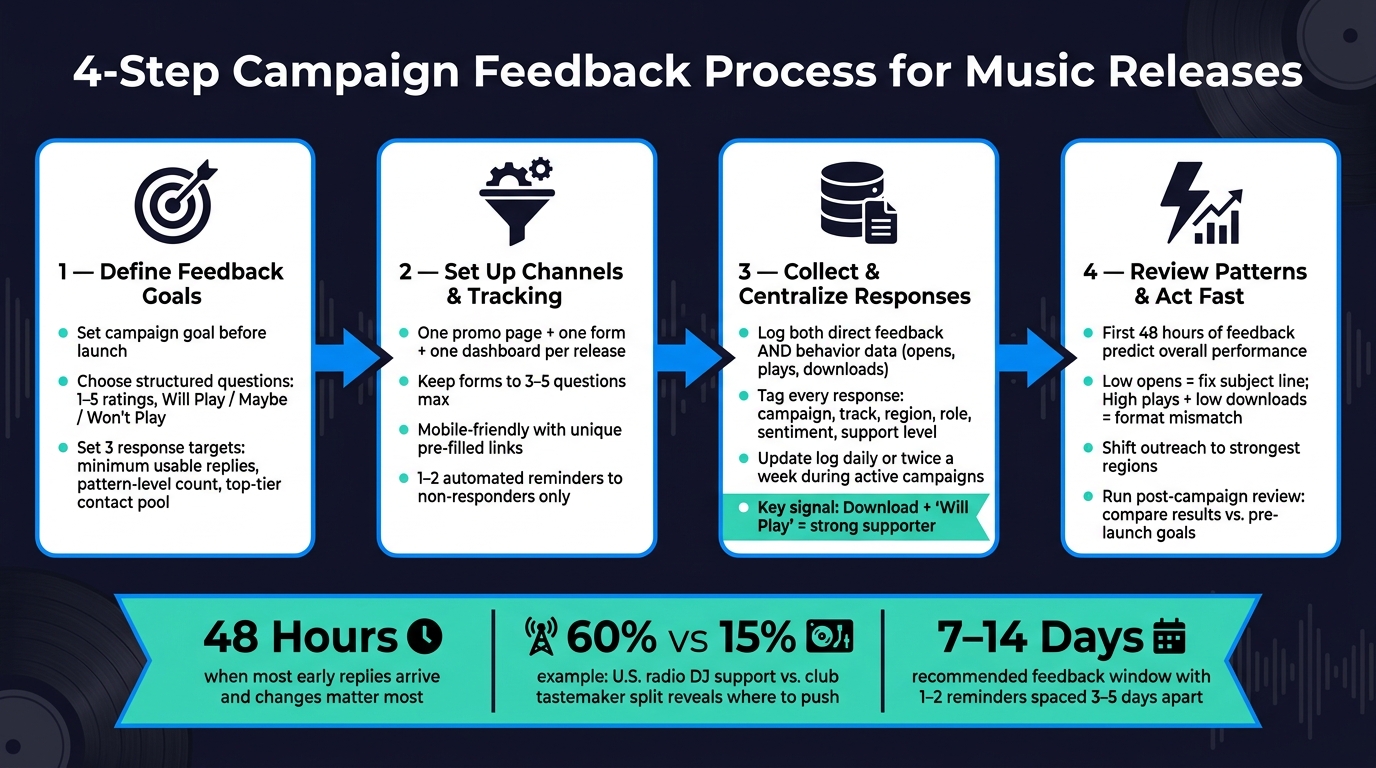
4-Step Campaign Feedback Process for Music Releases
Quick overview
| Step | What I do | What it helps me answer |
|---|---|---|
| 1 | Define the feedback needed before launch | Which track, market, or contact group matters most |
| 2 | Set up the form, promo page, and tracking | How I collect clean replies with less drop-off |
| 3 | Log replies and behavior in one place | Who is showing interest vs. who may support |
| 4 | Review patterns and act during the campaign | What to change before the next send |
Bottom line: I do not need more data. I need usable feedback that points to the next move.
sbb-itb-888513b
1. Define the Feedback You Need Before the Campaign Starts
Before you launch, get clear on what the feedback needs to help you decide. Is this campaign meant to identify the lead single, measure market support, or flag priority follow-ups? That choice shapes everything that comes next, from the form you use to the tracking setup.
Set Campaign Goals and Response Goals
The form should match the campaign. For club promo, ask about support choice and venue details. For radio, collect station, format, and spin data. For playlists, ask for playlist name, platform, and timing. That way, each response connects to a decision you’ll make later.
Set three targets before launch:
- a minimum number of usable responses
- a response count that is large enough to show a pattern
- a small pool of replies from top-tier contacts
Once those targets are locked in, choose response fields that collect that data cleanly.
Choose Structured Questions and Response Formats
Keep the question set short. A 1–5 rating scale works well for track quality, dancefloor potential, or playlist fit. A Will Play / Maybe / Won’t Play field turns general opinion into a direct support signal. Pre-set checkboxes like Club play, Radio play, Playlist add, and Social shoutout make it easy for recipients to reply in seconds, and they map straight to support metrics you can count.
Put ratings and support choices first. Leave comments in one optional field below.
Set Feedback Windows and Follow-Up Timing
Use four windows. Start with an early send to your top 10–15 contacts about one week before the main send so you can lock in early support. Then send to your broader list 2–3 weeks before the release date. Use release week for final reminders. After that, schedule a post-campaign review 2–4 weeks after release to gather late feedback and compare early Will Play pledges with actual outcomes.
Each promo should show the deadline in clear U.S. date format. For example: "Please submit your feedback by 09/03/2026." If timing matters, include the time zone too: "Embargo lifts 08/21/2026, 10:00 AM ET." A short note like "Feedback form takes less than 2 minutes" can help as well, because people are more likely to reply right away instead of putting it off. Give contacts 7–14 days to respond, with 1–2 reminders spaced 3–5 days apart.
With targets and timing set, the next step is choosing where feedback will come from.
2. Set Up the Right Channels and Tracking for Feedback Collection
Once your goals, questions, and timing are locked in, build the feedback flow before launch.
Use Promo Pages, Forms, and Platform Dashboards
Use an email promo page, a short feedback form, and one dashboard. Keep it to one page per release so the track, form, and tracking all connect to the same response record.
The promo page should bring everything into one spot: the track, release details, an embedded player, and the feedback form. That way, people can listen and reply without bouncing between tabs or tools. Promoly lets labels and artists send promos, collect ratings and comments, and track opens, plays, and downloads in real time. The aim is simple: one clean record per contact, not scattered notes across different systems.
If you need more detailed input, like A&R testing or mix comparisons, add a short standalone web survey. But keep that for A&R leads and key partners only.
Keep Feedback Requests Short and Mobile-Friendly
Most DJs and programmers check promos on their phones between gigs or while moving around. If the form feels clunky on mobile, people will drop off fast.
Stick to 3–5 questions max:
- a rating scale
- a support choice field
- one optional comment box
Use unique links when you can, so details like name and email are already filled in. That makes it easier for recipients to tap, respond, and move on. Requiring feedback before download can also keep things tight; the interaction takes about 30 seconds.
Set up automated reminders for non-openers and non-responders, and keep follow-ups to 1–2 per campaign. Only resend to non-openers and non-responders.
Compare Feedback Channels Before Launch
| Channel | Response Rate | Feedback Depth | Best Use Case | Common Issues | How to Use It |
|---|---|---|---|---|---|
| Email promo pages | Medium–high with clean lists | Moderate–high (ratings, comments, support intent) | Core DJ/tastemaker and radio outreach | Inbox overload; deliverability issues | Primary campaign channel; use unique links and track opens, plays, and downloads via your promo platform |
| Web surveys | Low–medium | High (structured, multi-question) | In-depth feedback from key partners; A&R testing | Feels time-consuming; mobile drop-off on longer forms | Reserve for targeted groups; keep short and mobile-optimized |
| In-platform forms | Medium | Moderate (ratings, short comments) | Integrated promos with centralized tracking | Limited space for long-form feedback | Use for campaigns run through a promo platform |
| Social replies | Low | Low (unstructured sentiment) | Public sentiment; fan engagement | Hard to centralize; unstructured data | Treat as supplementary; log manually into your feedback log weekly |
Send promos only to opted-in contacts, and include a clear unsubscribe link in every email. Unique links also make opt-outs easier to manage.
Once the channels are live, log every reply in one place so live feedback and campaign data stay in sync.
3. Collect and Centralize Feedback While the Campaign Is Live
Once your channels are live, track every response as it comes in. That way, you can act before the campaign wraps up, not after.
Capture Both Direct Feedback and Behavior Data
Direct replies tell you more than passive engagement. A few opens or one play show some interest. But a download plus a "Will Play" pledge tells a very different story.
Direct feedback should include structured ratings, written comments, Will Play / Maybe / Won’t Play decisions, and any venue, radio show, or playlist details people share. Engagement data – opens, plays, downloads, and click-throughs from your promo pages – helps you see who is actively interacting and who is just getting your emails.
The key is to read both signals together. If a DJ opens, plays, downloads, and replies "Adding this to my Friday night set", that’s a strong supporter. If someone opens once and never plays the track, interest is probably low.
When you pair those signals, tagging responses gets much easier.
Tag Every Response So It Can Be Sorted Later
As replies come in, sort them by the fields that matter most. Tag each one using the same labels every time: campaign, track, region, contact type, sentiment, and support level.
This setup makes filtering fast. For example, if you filter by "Club DJ" + "Club Play" + "Strong Positive", you’ll surface your hottest supporters in that lane. Filter by "Radio Host" + "Los Angeles, CA", and you can check local radio traction in seconds.
Build One Clean Feedback Log
Use one row per recipient per campaign, and attach every response to that row. Here’s the core set of fields to track:
| Field | What to Record |
|---|---|
| Recipient Name | Full name of the contact |
| Role | Club DJ, Radio Host, Playlist Curator, Journalist, Internal |
| Region | City, State (e.g., Chicago, IL) |
| Date | MM/DD/YYYY format |
| Opens / Plays / Downloads | Count of each engagement action |
| Rating | 1–5 scale |
| Support Status | Will Play / Maybe / Won’t Play / Playlist Add |
| Support Quote | Their exact words, copied verbatim |
| Support Type | Club Play, Radio Rotation, Playlist Add, Press Coverage |
| Follow-Up Status | Pending / Sent Remix Pack / Needs Reminder / Complete |
Pull live opens, plays, downloads, and feedback into the log as responses arrive. A clean, live log helps you spot winners, weak spots, and follow-up priorities while the campaign is still moving.
Update the log daily or twice a week during active campaigns. And if a contact’s support changes, update that row right away.
4. Review Feedback and Turn It Into Campaign Actions
Find Patterns That Affect Campaign Performance
Once your log is filled out, the job changes. Now you need to sort signal from noise.
A single DJ saying "the intro is too long" is just one opinion. But if several DJs in different markets say the same thing, that’s a pattern you can act on. At that point, the feedback stops being random commentary and starts looking like market research from the people who can help a release land.
Start by splitting feedback by role before you make any calls. DJ feedback tells you about dancefloor fit, set usability, and possible mixing issues. Journalist feedback tells you whether the release has editorial appeal and whether there’s a story worth covering.
Then compare ratings against behavior data using the fields you logged – role, region, support status, and behavior data. A reply tied to a full listen and a download should carry more weight than a high score from someone who only opened the email and did nothing else. If plays are high but downloads stay low, that often points to interest without a good fit for that format.
Region and genre matter too. If one market or one segment reacts much better than another, that’s a strong hint to tighten your targeting and put more time and budget toward the contacts most likely to respond.
Use Results to Adjust the Campaign Quickly
The first 48 hours of feedback often tell you how the release is likely to perform overall. That’s the window where changes still matter most.
Low open rates usually point to a subject line issue. The hook didn’t land. High plays with low downloads can mean the content got attention, but it wasn’t quite right for that person’s platform or use case. Repeated comments about one track on an EP can also shift your plan. Sometimes the track you picked as the lead isn’t the one people react to most. If several DJs rate the same deep cut higher than your planned A-side, pay attention.
Make the changes while the campaign is still moving:
- Shift outreach toward the regions showing the strongest support
- Update subject lines for the batches you haven’t sent yet
- Move high-engagement contacts into a priority follow-up group
- Reallocate ad spend toward the format or genre segment getting the best response
Do that before the next send goes out.
Run a Post-Campaign Review and Wrap-Up
When the campaign ends, compare the final results with the goals you set before launch. Did you hit your response targets? Which contact segments gave you the most useful feedback? Where did engagement fall off?
During the review, sort feedback by what it tells you, not just by how much of it you collected. This is where each type earns its place:
| Feedback Type | Examples | Use |
|---|---|---|
| Structured | Star ratings (1–5), multiple-choice questions like "Would you play this?", forms | When deciding on lead singles or comparing genre performance across large lists |
| Unstructured | Written comments, emails, social media reactions | When troubleshooting track structure or refining direction |
| Behavioral | Open rates, play duration, download counts | To check whether ratings line up with actual engagement |
Then follow up with your strongest supporters. Reach out personally to any DJ or journalist who gave strong feedback or said they’ll use the track in a set. Update your contact list by tagging steady contributors as high-priority, and re-segment contacts who keep downloading without ever engaging. Log the winning signals, weak spots, and follow-up priorities so the next campaign starts from a better place.
Conclusion: Keep a Simple Feedback Process for Every Release
These four steps work because they give you a repeatable process: define what you need, make it easy for people to respond, log everything in one place, and act while the campaign is still live.
The bigger risk is inconsistency. If you change the questions, tags, or timing from one release to the next, it becomes hard to compare results in any useful way.
That kind of consistency only happens when every response goes into one log. A lean setup – one or two questions, one promo link, and one shared log – keeps each release easy to compare. Promoly can centralize opens, plays, downloads, ratings, and comments in one place.
Once the process is repeatable, the payoff builds with each release. The goal is consistency, not perfection. If you use the same process every time, you start to see what works, who responds, and where to focus next.
FAQs
How many responses are enough to spot a real pattern?
Don’t put too much weight on one review. A single negative comment doesn’t automatically mean a track missed the mark.
Instead, watch for patterns across several responses, and compare feedback over three or four releases. After a while, you’ll get a much clearer sense of what keeps landing with your audience.
What should I do if contacts open the promo but don’t respond?
Keep your follow-up simple and professional. Send one brief, polite follow-up email five to seven days after your first outreach. The goal is straightforward: confirm they received it and let them know you’re happy to help.
If there’s still no reply, don’t send another follow-up. At that point, it’s better to move on and put your energy into the next release. If it makes sense for your process, Promoly’s automated reminders and campaign dashboard can help you reconnect with contacts and spot the people who are engaging most.
How do I decide whether to change the lead track mid-campaign?
Base the decision on feedback and engagement data from your promo campaign in Promoly. Pay close attention to patterns in star ratings and written comments from DJs, journalists, and tastemakers.
If the same track keeps coming up as the standout, that’s a strong signal. And if your planned single is getting tagged as the weakest cut on the EP, it may be time to change course and push the track earning the best response instead.